
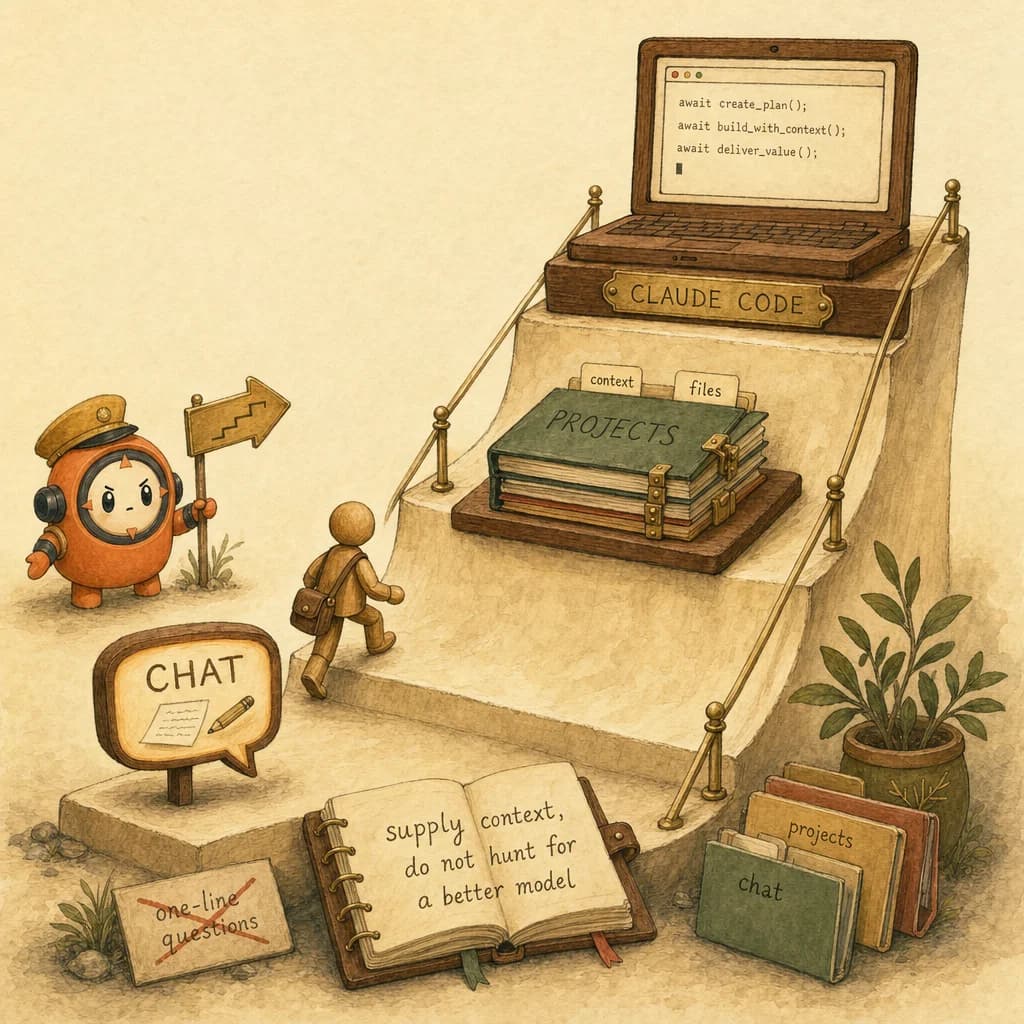
- ✓Claude is Anthropic's AI assistant, and the fastest way to get productive is to climb three rungs: chat, then projects, then Claude Code. Each rung reuses the context from the one below it, which is the exact context skill the Claude Certified Architect exam tests.
- ✓The same getting-started ground, mapped to the certification. Read this blog for the narrative, that page for the exam-aligned version.
- ✓The chat rung is just prompting. Role, context, task, format is the unlock, and it is heavily tested as D4 (20%).
- ✓Durable, reusable context is how productivity compounds. CLAUDE.md is the Claude Code version of it, and a D3 staple.
Quick answer
Claude is Anthropic's AI assistant, and the fastest way to get productive is to climb three rungs: chat, then projects, then Claude Code. Most beginners stall on rung one because they treat Claude like a search box. You climb faster by giving Claude context: a role, your situation, the task, and the format you want. That same context skill is what the Claude Certified Architect exam later tests.
What is Claude, in one paragraph?
Claude is Anthropic's family of large language models, the AI assistant you talk to in plain language to write, analyse, code, and reason. It comes in tiers (Opus is most capable, Sonnet is the balanced workhorse, Haiku is fastest) and extends beyond chat into Claude Code and the Model Context Protocol (MCP). (publicly documented) Anthropic is an AI safety company founded in 2021 by Dario and Daniela Amodei and other former OpenAI researchers; the assistant is named after Claude Shannon, the founder of information theory. For the full overview, see what is Claude.
The thing nobody tells a beginner: the model is rarely your bottleneck. The context you give it is. Claude offers one of the largest context windows available (on the order of 200K tokens), which is only useful if you actually put your situation into it. (reported; the exact number changes by model, so treat it as "very large," not a fixed figure.)
Three ways to use Claude
There is not one Claude product, there are three surfaces, and they form a ladder. Each rung reuses the context of the one below it.
| Rung | What it is | Best for | The skill it builds | CCA-F domain |
|---|---|---|---|---|
| 1. Chat (claude.ai) | One conversation at a time | Drafting, explaining, quick analysis | Writing context-rich prompts | D4 Prompt Engineering (20%) |
| 2. Projects | Chat plus reusable instructions and files | Recurring work with shared context | Giving Claude durable context | D5 Context Management (15%) |
| 3. Claude Code | Claude in your codebase, in a loop | Building, refactoring, automation | Driving an agentic loop | D3 Claude Code Workflows (20%) |
You do not need rung three to be productive. A writer or analyst can live happily on rungs one and two. But knowing the ladder exists is what stops you plateauing on rung one.
How to actually get productive (the part the tutorials skip)
The single highest-leverage habit is structuring your first message. A blank "write me an email" gives Claude nothing to work with, so it guesses, and you blame the model. Give it four things instead:
- Role: who Claude should be ("you are a B2B copywriter").
- Context: your real situation ("we sell an exam-prep app to working professionals").
- Task: the specific ask ("write a 120-word launch email").
- Format: what the output should look like ("plain text, one call to action, no subject line").
That is role, context, task, format, and it is also the spine of CCA-F domain D4. (first-hand: this is the prompting pattern the concepts pillar teaches.)
Worked example - "from blank box to a usable draft in three messages."
- Message one: give the four things above. You get a draft that is 80% right because it finally knows your situation.
- Message two: correct, do not restart. "Make the second paragraph about time saved, not features." Claude edits in place because the context is already loaded.
- Message three: lock it in. "Good. Save these instructions so I can reuse them." Move the role and context into a Project so your next ten emails start at message two, not message one.
That move, promoting one-off context into reusable context, is the whole game. It is why rung two exists.
A name for it: the Claude On-Ramp
The Claude On-Ramp - the three-rung path from chat to projects to Claude Code, where each rung reuses the context of the one below it. You do not jump to the top; you climb, and your productivity compounds because you stop re-explaining yourself at every step.
The failure mode has a name too:
The Blank-Prompt Plateau - treating Claude like a search engine, typing one-line questions with no role, context, or format, and concluding the model is mediocre. Almost every "Claude is not that good" story is really a stalled climber stuck on rung one.
The cure for the plateau is not a more capable model. It is more context, supplied deliberately, and then made reusable.
Why it matters for CCA-F
Here is the proprietary read you will not get from a generic "intro to Claude" post: the beginner productivity unlock and the certification syllabus are the same skill, viewed at two zoom levels.
- The chat habit (role, context, task, format) is D4 Prompt Engineering and Structured Output, 20% of the exam.
- The projects habit (give Claude durable, reusable context) is D5 Context Management and Reliability, 15%, and its Claude Code form is the CLAUDE.md hierarchy in D3 (20%).
- The Claude Code habit (drive a loop, not a chat) is the heart of D3 Claude Code Configuration and Workflows.
The distractor pattern to memorize. On D4 and D5 scenario questions, the trap answer is almost always "switch to a more capable model" or "write a longer, cleverer prompt." When a scenario describes Claude giving generic or inconsistent output, the architecturally correct move is usually one of:
- Add the missing context (system prompt, project knowledge, the actual files), or
- Make that context durable and reusable (instructions, CLAUDE.md), or
- Constrain the output (ask for a specific structure or schema).
If that list looks familiar, it should: it is the Blank-Prompt Plateau cure, written as an exam rubric.
How to apply it
- Start on rung one today. Open claude.ai and run one real task with role, context, task, and format. No setup required.
- Promote context, do not retype it. The moment you explain your situation twice, move it into a Project. Re-explaining yourself is the tax you stop paying.
- Correct, do not restart. Editing in a loaded context beats opening a fresh chat. Fresh chats throw away everything Claude just learned about you.
- Climb to Claude Code when chat feels natural. Not before. The third rung rewards people who already think in context.
- Measure where you actually stand. Once Claude feels productive, take the free diagnostic. It maps your habits to the five exam domains in about ten minutes, no signup.
The meta-skill is the same at every rung and on every exam question: stop hunting for a better model, and start supplying better context.
5 direct routes into the scored material.
- knowledgeThe same getting-started ground, mapped to the certification. Read this blog for the narrative, that page for the exam-aligned version.
- conceptsThe chat rung is just prompting. Role, context, task, format is the unlock, and it is heavily tested as D4 (20%).
- conceptsDurable, reusable context is how productivity compounds. CLAUDE.md is the Claude Code version of it, and a D3 staple.
- knowledgeThe third rung. What Claude Code is, and the workflows and context mastery the exam expects.
- practiceOnce you can use Claude, find out how much of the architecture you already know. 10 questions, no signup, generates a plan.
Share this post.
One share is one less person stuck on the same question.