
What this system is, and its 5 parts
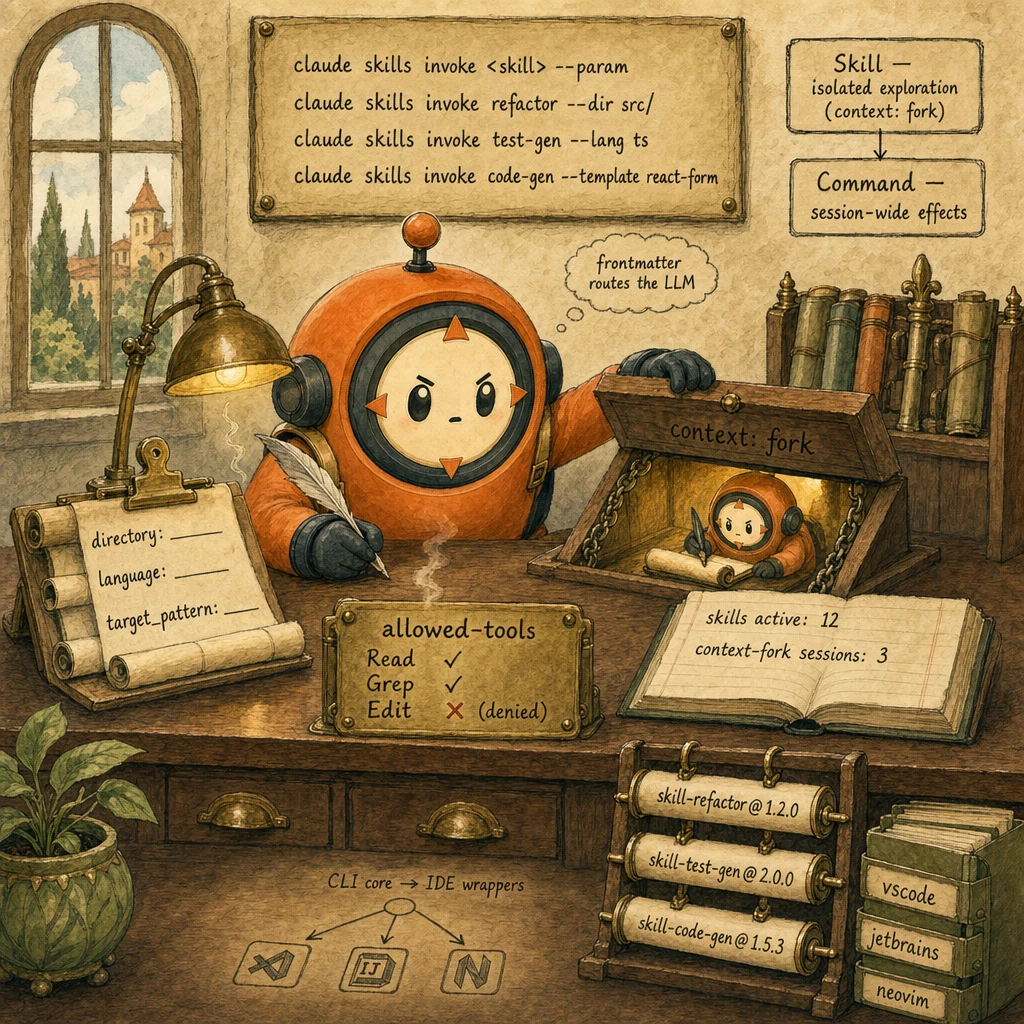
Think of this as the way you give every developer on the team a small library of pre-baked Claude workflows they can invoke from the command line. A refactoring Skill explores a function in an isolated child session and proposes the change without ever touching the working tree. A test-generation Skill reads a source file and writes a matching test file. A code-generation Skill scaffolds a new component in your team's exact style. Each Skill has a tight whitelist of tools it can use, a parameter shape that makes it reusable across repos, and a Git tag that pins which version each invocation runs against. The whole point is that developer tooling Skills work like npm packages built on top of Claude rather than fragile prompt copy-paste.

Skill Definition File
.claude/skills/{team}/{name}.mdThe unit of dev-tooling Skills. Markdown body holds the instructions; YAML frontmatter holds the metadata: name, version (semver), description, parameters (with types and defaults), allowed-tools (whitelist), context_mode (session or fork). Lives in version control. Reviewed via PR.
ConfigurationPath: .claude/skills/{team}/{name}.md. Required frontmatter: name, version, description, parameters, allowed-tools, context_mode. Optional: deprecated, owners, requires_human_confirm.Concept: skills →Skill Frontmatter (Attention Engineering)
metadata routes the LLM to the right SkillThe frontmatter is read into the agent's system prompt at invocation; the LLM forward-pass uses it to decide whether the Skill fits the request. It is NOT a regex classifier. Good frontmatter (clear description, accurate when_to_use, well-typed parameters) lifts routing accuracy substantially.
Configurationname: refactor-fn. version: 1.2.3. description: 'Rename a function and update every call site.'. when_to_use: 'When the user asks to rename a function across the repo.'. parameters: { directory: string, old_name: string, new_name: string }. allowed-tools: [Read, Grep, Glob, Edit].Concept: attention-engineering →context: fork Isolation
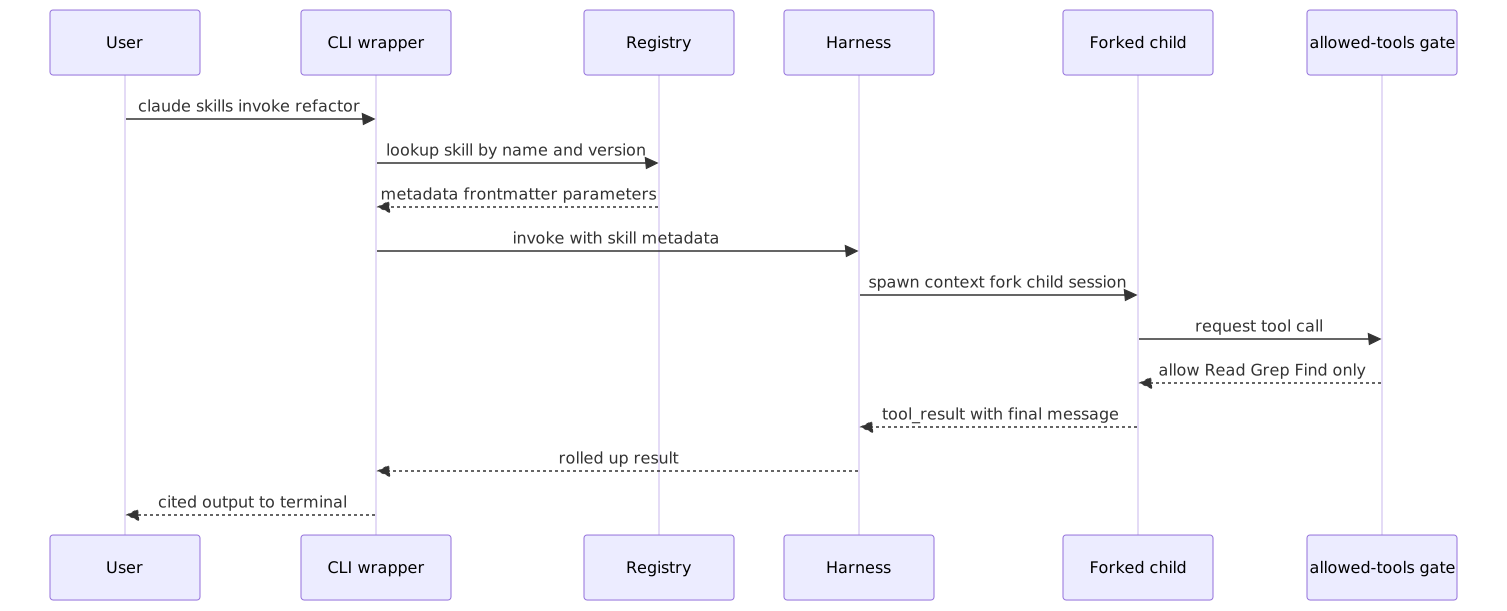
child session runs in isolation, parent untouchedWhen a Skill is exploratory (refactoring, test-gen, doc-gen), the CLI spawns a child session with context: fork. The child has its own conversation history and its own working tree view. Whatever the Skill explores or proposes stays in the child until the parent receives the final tool_result and decides whether to merge. Lighter than a full subagent, sufficient for one-Skill scope.
Configurationcontext_mode: fork in the Skill frontmatter. CLI spawns an isolated session per invocation. Parent receives only the tool_result payload (proposed diff, generated test file, doc string). Parent decides whether to apply.Concept: subagents →
allowed-tools Whitelist
explicit, structural, deny-by-defaultEvery Skill declares its allowed-tools array in frontmatter. The CLI enforces the whitelist at tool_use interception: any call to a non-whitelisted tool fails with is_error: true. By default, Edit and Bash are NOT on the list. A code-gen Skill that only needs to read files lists [Read, Grep, Glob]; a refactoring Skill that needs to write changes adds Edit. Side-effect prevention is structural, not prompt-based.
Configurationallowed-tools: [Read, Grep, Glob]. SDK-side enforcement: tool_use calls outside this list return tool_result with is_error: true. The Skill body cannot escalate its own tool list.Concept: tool-calling →
IDE/CLI Integration Wrapper
CLI-first; IDE is a thin shell over the CLIThe CLI is the canonical entry point. IDE extensions (VSCode, JetBrains, Neovim) shell out to the CLI rather than re-implementing Skill invocation logic. This means a Skill update in the registry propagates to every editor immediately. New editors get supported by writing a 200-line shell-out extension, not a full Skill engine.
ConfigurationVSCode extension binds keybinds and context-menu items to claude skills invoke <skill> --param .... The extension's only job is to translate UI events to CLI calls and stream output back to the editor.Concept: claude-md-hierarchy →
The problem
- One source of truth for refactoring, test generation, doc generation. Not 12 copy-pasted prompts in 12 repos.
- Risk-free exploration. A refactoring Skill must propose changes without touching the working tree.
- Reusable across repos. A Skill written for the React team should work on the Python team's repo with parameter changes only.
- Versioned upgrades. A breaking change to a Skill must NOT silently break agents on the prior version.
- Skills built as IDE plugins first. Other editors get a parallel implementation that drifts. The CLI never exists.
- Skills with unrestricted tool access. A test-generation Skill accidentally calls Edit on a real source file.
- Skills hardcoded to one codebase. A team has to re-author the Skill for every new repo.
- Skills versioned by edit-in-place. A v2 frontmatter change silently breaks 12 agents.
- ✓ Skills live in .claude/skills/{team}/{name}.md with frontmatter (name, version, description, parameters, allowed-tools).
- ✓ CLI invocation: claude skills invoke <skill> --param key=value. IDE extensions wrap the CLI; they do not bypass it.
- ✓ Exploratory Skills run inside context: fork. The parent session is untouched.
- ✓ allowed-tools is an explicit whitelist on every Skill. Edit and Bash are not on the list unless required.
- ✓ Parameters are declared in frontmatter and validated by the CLI before invocation.
- ✓ Git tags pin versions: skill-refactor@1.2.3. Callers reference the major (@1.x); registry resolves the latest patch.
One run, traced end to end

8 steps to production
Lay out the team-namespaced directory
Create .claude/skills/{team}/{name}.md per team. The directory IS the registry's source of truth. Even on day one, namespace from the start. Retrofitting a flat layout into namespaces at 50 Skills is painful.
Concept: skills →import os
TEAMS = ["frontend", "backend", "data", "shared"]
for t in TEAMS:
os.makedirs(f".claude/skills/{t}", exist_ok=True)
with open(f".claude/skills/{t}/.gitkeep", "w") as f:
pass
print("namespace-by-team layout ready; commit and start authoring.")Author the Skill with full frontmatter
Required keys: name, version, description, when_to_use, parameters (with types and defaults), allowed-tools (explicit whitelist), context_mode (session for state-shared, fork for isolated). Body holds the prompt. The CLI validates frontmatter at parse time; invalid Skills are rejected.
Concept: attention-engineering →Spawn the Skill in context: fork
When context_mode: fork is set, the CLI runs the Skill in a child session with its own conversation history, its own tool whitelist, and its own working tree view. The parent session is untouched. The child returns a tool_result with the proposed change; the parent decides whether to apply.
Concept: subagents →Enforce allowed-tools at the SDK boundary
The frontmatter declares the whitelist; the CLI enforces it. Any tool_use call that targets a non-whitelisted tool fails with is_error: true. The Skill body cannot escalate its own tool list. This is structural, not prompt-based: a clever prompt cannot trick the SDK into calling Edit on a Skill that does not whitelist Edit.
Concept: tool-calling →Parameterize for cross-repo reuse
A good Skill is generic across repos. The Skill body uses {param_name} placeholders; the CLI fills them in from --param key=value arguments at invocation time. Required vs optional parameters are declared in the frontmatter; the CLI rejects invocations that miss required params before any LLM call.
Concept: structured-outputs →Build the IDE wrapper as a thin shell over the CLI
VSCode (or JetBrains, or Neovim) extension is the smallest possible shell over the CLI. It registers commands and keybinds, captures the developer's selection, builds a claude skills invoke shell command, runs it, and streams the output back into the editor.
Concept: claude-md-hierarchy →Discover Skills via the CLI registry
claude skills list walks .claude/skills//*.md and ~/.claude/skills//*.md, parses frontmatter, and prints a discoverable table. IDE extensions call this and feed the result into command palettes.
Concept: evaluation →Version Skills via Git tags; pin majors
Each Skill carries a semver in frontmatter. Each release tags the Git history (git tag skill-refactor@1.2.3). Callers pin a major (@1.x); the registry resolves to the latest patch within that major. Edit-in-place is forbidden by PR review.
Concept: tool-calling →9 decisions the exam turns into distractors
IDE-first. Skills built into a VSCode plugin and ported to other editors as parallel implementations.
CLI-first. IDE extensions wrap the CLI.
Use Command for everything because it is simpler.
Skill if the work needs isolated exploration (context: fork) or reusable parameters. Command if the work has session-wide effects.
Unrestricted tools. The agent will be careful.
Explicit allowed-tools whitelist (Read, Grep, Glob, Edit). No Bash. Edit only because the Skill genuinely needs it.
Hardcode paths and language. Fork the Skill per repo.
Parameterize: directory, language, target_pattern. The Skill body uses {placeholders}. The CLI fills them in.
The team builds Skills as a VSCode extension first. Six months later, JetBrains and Neovim users are stuck or get a parallel re-implementation that drifts. Updates ship to one editor at a time.
CLI-first architecture. The CLI is the canonical entry point. IDE extensions are ~200-line shells over the CLI. New editors get supported with a tiny wrapper. The CLI stays the source of truth.
A test-generation Skill is granted full tool access. A clever prompt-injection in source comments tricks it into calling Edit on a real source file and overwriting the working tree.
allowed-tools whitelist on every Skill. Explicit list. No Bash, no Edit unless the Skill genuinely needs them. SDK enforces the whitelist; the Skill body cannot escalate.
A refactor Skill hardcodes directory=src/ and language=tsx. Backend team needs the same Skill on app/ with language=py and forks the file. Now there are 5 forks across teams.
Parameterize: declare directory, language, target_pattern in frontmatter. The Skill body uses {placeholders}. The CLI substitutes them at invocation. One Skill, infinite repos.
The team has no clear criterion. Some workflows are Skills, some are Commands, the choice is ad-hoc. New developers cannot predict which to author for a new use case.
Explicit decision tree. Skill if context: fork is needed (exploration without touching parent state) or if parameters make it reusable. Command if the work has session-wide effects.
Skills are edited in place. A v2 frontmatter change ships; 12 agents that depended on the v1 shape silently break. Nobody knows which Skill regression caused the failure.
Git semver tagging. skill-refactor@1.2.3. Callers pin major (@1.x); the registry resolves to the latest patch. Breaking changes bump the major and ship as @2.0.0.

Cost & latency
Skill body ~500 tokens system + parameters ~50 tokens + child working tokens ~1500-3000 input + ~500 output. Sonnet 4.5 pricing.
Fork setup writes a fresh system prompt and instantiates child message history. No LLM-side cost beyond a few extra tokens.
Editor event triggers shell-out to the CLI; CLI parses Skill; spawns child session; child returns. The Claude API call dominates.
Frontmatter and body per Skill ~5-15 KB. 100 Skills with full Git history of 5 versions per Skill ~10 MB checked into the repo.
Combined Claude tokens, CLI overhead, registry lookup. At 1000 invocations per day across the team, ~$4 per day, ~$120 per month.
Check every gate before release
5 exam-pattern questions
Work through one question at a time, check the architecture, then move through the set.
You are designing a Skill for TypeScript refactoring. The agent should explore changes without affecting the working directory. Which feature isolates the exploration: context fork or allowed-tools?
Frequently asked
Can a Skill modify files?
Only if allowed-tools includes Edit (or Write). Refactoring Skills typically grant Edit. Exploratory Skills (test-gen, code-gen, doc-gen) often deny it: they propose changes via the tool_result payload and let the parent session decide whether to apply.
How does the IDE know which Skills are available?
The IDE extension calls claude skills list (which walks .claude/skills//*.md and ~/.claude/skills//*.md) and feeds the result into its command palette. The CLI is the source of truth.
What is the difference between context: fork and a Subagent?
context: fork is lightweight isolation for a single Skill invocation: fresh messages, scoped tools, parent untouched. A full Subagent is a separate agent loop with its own task and full autonomy. Use fork for one-shot exploration. Use Subagent for delegated work that needs its own multi-turn loop.
How do I version a Skill?
version: MAJOR.MINOR.PATCH in the frontmatter; git tag skill-name@1.2.3 on release. Callers pin a major (@1.x); the registry resolves to the latest patch. Breaking changes bump the major; existing callers stay on v1.x until they migrate.
Can a Skill call another Skill?
Yes, if both are in allowed-tools. The composing Skill lists invoke_skill as an allowed tool. Composition enables shared building blocks. Avoid deep nesting (depth > 2): debugging multi-level Skill chains is painful.
Does Skill frontmatter override the agent's decision-making?
No. Frontmatter is attention engineering, not a regex classifier. The LLM forward-pass reads the frontmatter into context and uses it to decide whether the Skill is the right fit. Good frontmatter lifts routing accuracy substantially without removing the model's agency.
What happens if a Skill fails?
The child session returns a tool_result with is_error: true and a structured error payload. The parent agent observes the error and decides: retry with different parameters, propose an alternative Skill, or escalate. Failures do NOT propagate to the parent's working tree because of context: fork.