

What this system is, and its 5 parts
Think of this as the way a whole team uses Claude Code on the same codebase without each developer getting a different answer. The team writes its conventions down once. Stack, code style, the commands you actually use. And Claude reads them on every session, like a runbook. Before any complex change, the developer asks Claude to plan first (read the code, sketch the approach, get approval), and only then to edit files. The result: code that looks like one team wrote it, refactors that don't break imports, and pull-request reviews that don't lose track of what changed by the fourteenth file.

CLAUDE.md Hierarchy
three-level persistent memoryAnchors team conventions, personal preferences, and system-wide rules. Project-level CLAUDE.md is committed to the repo; personal CLAUDE.local.md is gitignored; system-level lives in ~/.claude. Claude Code reads them in order on every session. The project file always wins on conflicts.
Configuration.claude/CLAUDE.md (project, committed): stack + commands + code style. .claude/CLAUDE.local.md (personal, gitignored): individual prefs. ~/.claude/CLAUDE.md (system): cross-project defaults. Conflicts: project > personal > system.Concept: claude-md-hierarchy →
Plan Mode
exploration before executionShift+Tab puts Claude into a read-only state where it can explore files, sketch dependencies, and propose a design. But cannot edit anything until the developer approves. This single gate eliminates the most expensive refactor anti-pattern (jump-to-code-without-understanding-deps).
ConfigurationShift+Tab toggles Plan Mode. Claude responses include a structured plan section. Developer reviews, refines (Adjust the plan to use Drizzle instead of Prisma), then approves. Approval flips to Code Mode and execution begins.Concept: plan-mode →
Skills Registry
domain-specific code generationOne Skill per domain (React components, API routes, DB queries). Each Skill has its own system-prompt additions, allowed-tools whitelist, and conventions. The developer invokes the right Skill per task and gets focused output without cross-domain context pollution.
Configuration.claude/skills/react-components/SKILL.md (Tailwind + TS + named exports). .claude/skills/api-routes/SKILL.md (zod + middleware + structured returns). Each has frontmatter + allowed-tools list. Loaded conditionally.Concept: skills →
.claude/rules/ Globs
rules keyed by file pathSplits the monolithic CLAUDE.md into area-scoped rule files that load only when Claude is editing matching files. Prevents the prompt from carrying API conventions when editing React, or vice versa. The attention budget stays focused on what's relevant to the current edit.
Configuration.claude/rules/react.md (globs: /*.tsx, /*.jsx). .claude/rules/api.md (globs: app/api/). .claude/rules/db.md (globs: lib/db/). Claude reads only the rule files matching the current edit's path.Concept: attention-engineering →
Code-Review Subagent
scoped tools, fresh context, two-pass reviewSpawned per PR with [Read, Grep, Bash] only. No Edit, no Write. Runs two passes: per-file local review against .claude/rules/, then a separate integration pass for cross-file consistency. Fresh context prevents lost-in-the-middle on long PRs.
ConfigurationSubagent task: 'Review changed files [list]. Pass 1: per-file style + tests against .claude/rules/. Pass 2: integration. API boundaries, shared state, type alignment.' allowed-tools: ['Read','Grep','Bash']. Returns structured verdict.Concept: subagents →
The problem
- Generated code that matches the team's conventions automatically. Same file naming, same style, same architecture decisions across every developer's session.
- Plan a complex refactor before touching files so reviewers see the design first and rework drops below 10%.
- Review a 14-file PR without losing track of file 3's decisions by the time the reviewer reaches file 14.
- No CLAUDE.md → conventions drift across sessions; snake_case in one file, camelCase in another, even within the same PR.
- Skipping Plan Mode → Claude jumps to writing files; 40% of changes get reworked when the design turns out to be wrong.
- Single-context PR review → by file 14, lost-in-the-middle drops the conventions established on file 3; inline comments contradict each other.
- ✓ PR-level convention drift = 0 (CLAUDE.md + .claude/rules/ enforced)
- ✓ Plan-Mode usage = 100% of refactors > 5 files (developer norm, not optional)
- ✓ Two-pass PR review on every PR > 6 files (per-file local, then integration)
- ✓ Subagent code review on the auto-generated diff before commit
One run, traced end to end
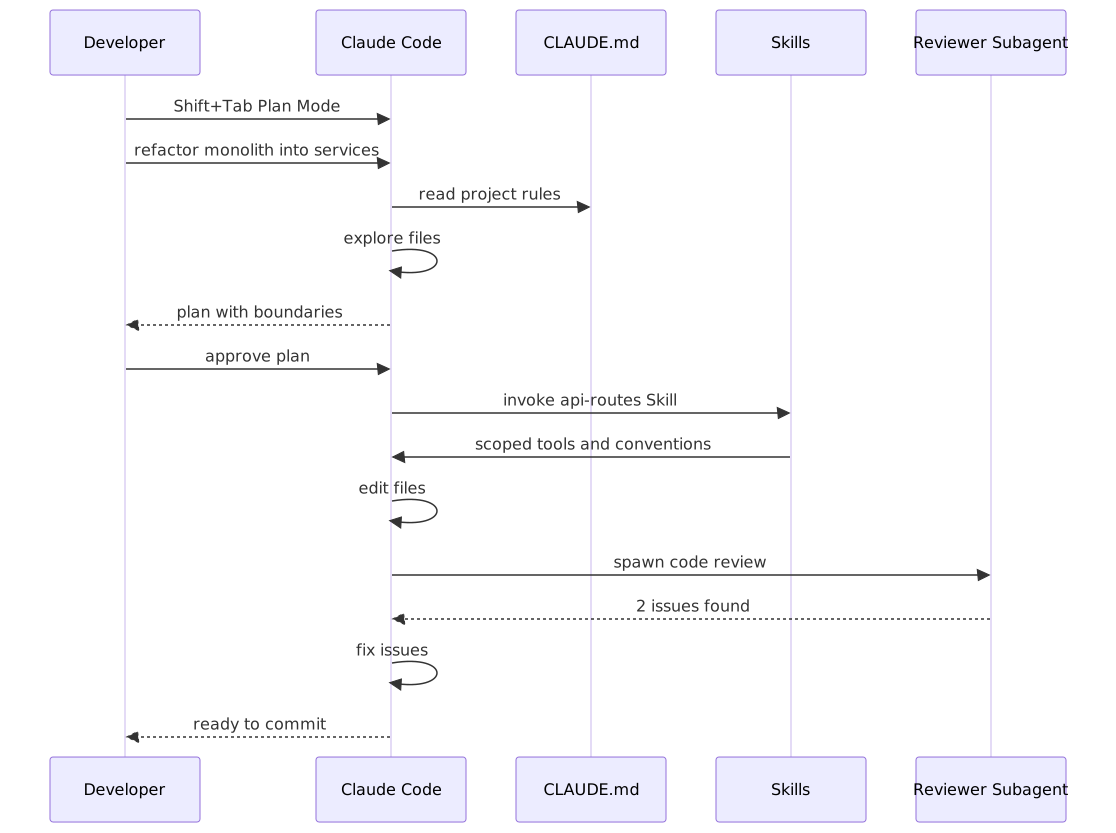

8 steps to production
Create the project-level CLAUDE.md
At the repo root, write .claude/CLAUDE.md documenting stack, commands, and code style. Keep it tight. This file is read on every session and competes for attention with the actual task. 200-400 words is the sweet spot. Commit to version control so the whole team's Claude Code sessions inherit the same rules.
Concept: claude-md-hierarchy →# .claude/CLAUDE.md (committed to repo, ~300 words)
# Project
Next.js 15 App Router + TypeScript strict + Tailwind v4 + Drizzle ORM.
# Commands
- Dev: `pnpm dev`
- Tests: `pnpm test`
- Lint + typecheck: `pnpm lint && pnpm typecheck`
- Build: `pnpm build`
# Code Style
- Named exports only (no default exports)
- 2-space indent
- Server Actions in app/actions/. Prefer over /api/
- Drizzle queries in lib/db/queries/
- Components: server by default; "use client" only when state or effects needed
# Architecture
- Auth: middleware.ts at root; protect /account and /admin
- Schema: lib/db/schema.ts is the single source of truth
- Types: derive from schema where possible (z.infer / drizzle types)Split conventions into .claude/rules/ globs
Once CLAUDE.md grows past ~500 words, split it. Move React conventions to .claude/rules/react.md with a glob /*.tsx, API routes to .claude/rules/api.md (app/api/), DB to .claude/rules/db.md (lib/db/). Claude loads only the rule files matching the file being edited. Attention stays focused.
Concept: attention-engineering →Use Plan Mode for any complex refactor
Shift+Tab → Plan Mode. Ask Claude to analyze the codebase first: read the relevant files, sketch dependencies, identify shared state, propose the refactor approach. Review the plan; refine if needed; only then approve and switch to Code Mode. The 5-minute plan review cost is dwarfed by the 30+ minute rework cost it prevents.
Concept: plan-mode →Build Skills for domain-specific generation
Create one Skill per domain. Each Skill has frontmatter (name + description + when_to_use), system-prompt additions for that domain, and an allowed-tools whitelist. The developer invokes the right Skill per task. Skills replace the monolithic-prompt pattern that bloats context with irrelevant rules.
Concept: skills →Spawn a code-review Subagent on every PR
After Claude Code generates a diff, spawn a code-reviewer Subagent with [Read, Grep, Bash] only. No edits. The subagent runs in a fresh context and does two passes: per-file local review (style, tests) and integration (cross-file consistency, API boundaries). Fresh context = no lost-in-the-middle on long PRs.
Concept: subagents →Use @mentions to target context, not load the whole repo
When asking about a specific area, use @path/to/file in the prompt. Claude pulls in only that file plus its imports. Not the entire codebase. Pair with CLAUDE.md's Key Files section so the team has a documented set of high-value entry points to mention.
Concept: context-window →Sequence non-orthogonal tasks; never mix in one session
Refactor + optimize is two tasks, not one. If the developer asks for both in a single session, expect ~40% rework. The optimization feedback invalidates half the refactor. Run them as sequential sessions: refactor cleanly first, commit, then optimize the new structure with fresh context.
Concept: evaluation →Save the rule when Claude makes a mistake
When Claude generates something the team doesn't want (default exports, wrong import order, /api/ instead of server actions), don't just correct in chat. Ask Claude to save the rule: 'Save this to CLAUDE.md or the right .claude/rules/ file.' Next session. And every other team member's session. Inherits the fix.
Concept: claude-md-hierarchy →9 decisions the exam turns into distractors
personal ~/.claude/CLAUDE.md (not shared) or inline comments in source files
.claude/CLAUDE.md (project-level, committed); split to .claude/rules/*.md when it exceeds ~500 words
Jump to code; correct as you go; merge refactor + optimization in one prompt
Plan Mode first; review the plan; approve; only then execute. Sequential subtasks per session.
One monolithic CLAUDE.md with every convention; one mega-tool list for everything
One Skill per domain in .claude/skills/; .claude/rules/*.md keyed by file glob
Single-pass review in the same session that wrote the code
Two-pass via a code-review Subagent with [Read, Grep, Bash] only. Pass 1 per-file, pass 2 integration
No CLAUDE.md. Each developer's Claude session generates code with different style. Snake_case in one file, camelCase in another, default exports in a repo of named exports.
Create .claude/CLAUDE.md at the project root, commit it, and document stack + commands + code style. Claude reads it on every session. When you correct Claude, ask it to save the new rule to CLAUDE.md so the next session inherits it.
Developer asks Claude to 'split this monolith into microservices'. Claude jumps to creating new files without understanding shared state, dependencies, or boundaries. ~40% of the changes get reworked.
Use Plan Mode (Shift+Tab) first. Have Claude analyze the monolith, identify boundaries, sketch the dependency graph, and present a plan. Review and approve, then switch to Code Mode for execution.
Single Claude Code session refactoring 50 files across React, API, and DB. Context bloats with file reads and assumptions; later edits are inconsistent with earlier ones.
Split into Skills (react-components, api-routes, database-queries) with their own system-prompt additions and tool whitelists. Invoke the right Skill per task; each runs in a focused context.
GitHub Action reviews a 14-file PR in one Claude session. By file 14, lost-in-the-middle has dropped the conventions seen on file 3. Inline comments contradict each other.
Spawn a code-review Subagent with scoped tools (Read + Grep + Bash). Two passes: per-file local against .claude/rules/, then integration for cross-file consistency. Fresh context, no carry-over noise.
Developer prompts: 'Refactor Redux to Zustand AND optimize bundle size.' Claude attempts both; refactor is 80% done when optimization feedback invalidates half. ~40% rework.
Sequence orthogonal tasks. Session 1: refactor only, commit. Session 2: optimize the new structure with fresh context. Each session has one clear goal; code review is per-PR easier; rework drops to <10%.

Cost & latency
Project CLAUDE.md ~600 bytes; three .claude/rules/*.md ~400 bytes each; 1-2 Skills ~500 bytes each. Negligible repo bloat; inlined to system prompt at session start.
Claude reads 6-10 key files (~15K input tokens) and returns a 1-2K-token plan. Cost ~$0.02-0.05. Saves ~$0.30+ in rework. ROI ~15×.
Initial code: ~20K input tokens (codebase + rules) + 5K output. Tests + revisions: +$0.02-0.05. Total ~$0.08-0.15.
Scoped to changed files only (~5K tokens) + 1-2K verdict. Two-pass adds ~30%. Catches 70%+ of style + integration bugs before human review.
Skills are .md files that load into the system prompt only when invoked. Per-Skill ~500 bytes; loading <100ms. No extra API calls; just attention engineering.
Check every gate before release
5 exam-pattern questions
Work through one question at a time, check the architecture, then move through the set.
Your team is using Claude Code on the same Next.js codebase. Each developer's session generates code with different style. What is the most maintainable way to enforce one set of conventions across the team?
Frequently asked
Why split CLAUDE.md into .claude/rules/ instead of keeping it monolithic?
Attention budget. Every line in the system prompt competes for the model's attention on every turn. A 1,500-word CLAUDE.md that mixes React, API, and DB conventions wastes attention when Claude is editing a React file (the API and DB rules aren't relevant). .claude/rules/*.md keyed by file glob loads only the rules matching the current edit. The prompt stays focused on what's actually relevant.
What's the difference between Plan Mode and just asking Claude to read the code first?
Plan Mode is enforced via the SDK. Claude literally cannot edit files until the developer toggles back to Code Mode. Asking 'read the code first' is a soft suggestion the model can ignore under pressure. For complex refactors, the hard gate matters: it forces the plan-then-execute discipline that prevents the most expensive class of refactor mistakes.
Can I use Skills and Subagents together?
Yes. They compose naturally. A Subagent is an isolation unit (fresh context, scoped tools); a Skill is a system-prompt customisation for a domain. A code-review Subagent might invoke a code-reviewer Skill that defines the review rubric. Subagent owns the context boundary; Skill owns the domain expertise.
How small should a Skill be?
Tight scope, single domain. A good Skill fits in 50-200 lines of frontmatter + system-prompt. If a Skill grows past 500 lines or starts covering multiple domains, split it (api-routes-rest vs api-routes-graphql, or react-components-server vs react-components-client). Smaller Skills route more accurately and load faster.
When should I use a Subagent vs. just continuing in the current session?
Use a Subagent when (a) you need context isolation (PR review, audit, parallel research), (b) the task has a scope boundary that won't pollute the parent context, or (c) you're running read-only analysis that doesn't need write access. Stay in the current session for inline reasoning where context continuity matters.
What's the fastest way to discover what Skills the team has?
Run claude skills list from the repo root. It scans .claude/skills/ (project), ~/.claude/skills/ (personal), and reports each Skill's name, description, and when_to_use. Pair with a CLAUDE.md ## Available Skills section that points to the canonical Skill set so new developers see them on day one.
Should I commit .claude/skills/ to the repo?
Yes for team Skills, no for personal experiments. Project-level Skills go in .claude/skills/ and are committed. They're team conventions, just like .claude/rules/. Personal experiments live in ~/.claude/skills/ (system-wide) and stay out of the repo until they're proven and ready to be promoted.