
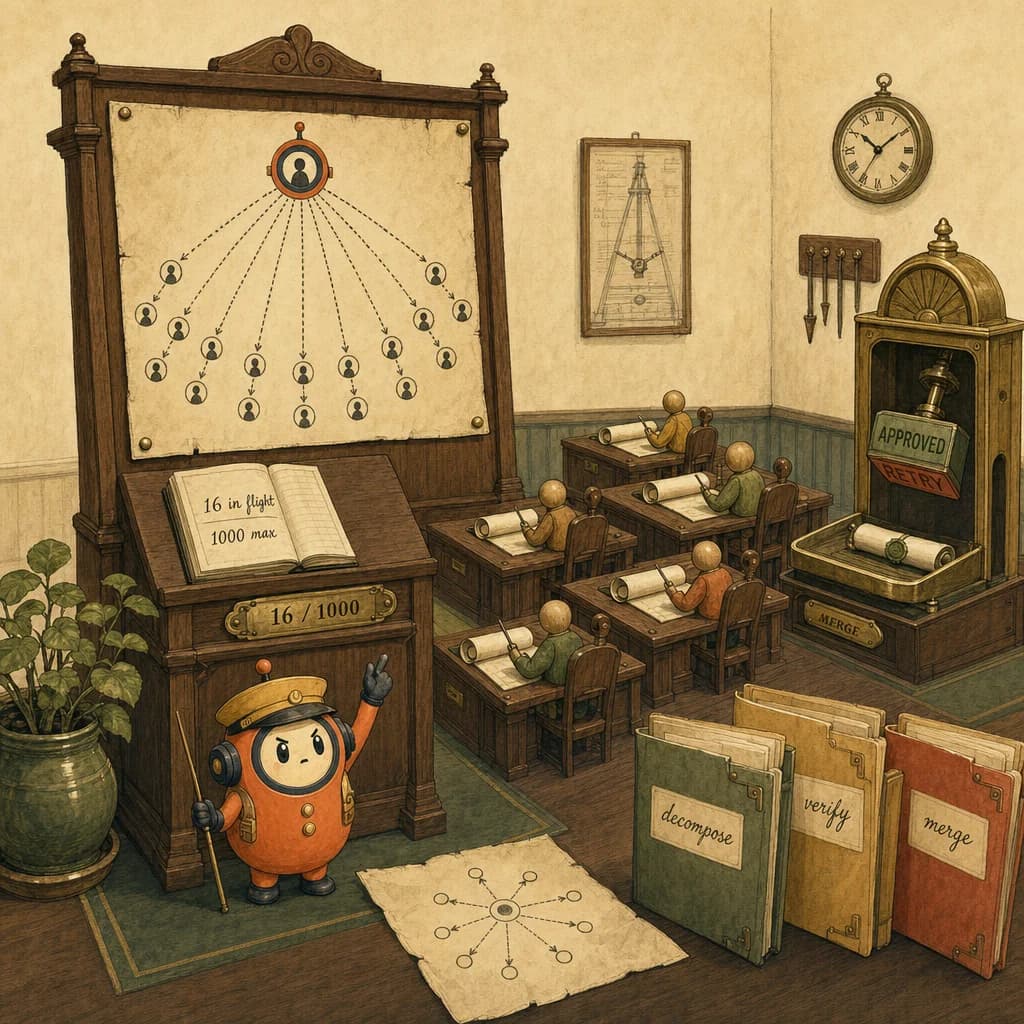
- ✓Dynamic Workflows let Claude Code write its own orchestration code and run a fleet of sub-agents - up to 16 concurrently and 1,000 per run - each checked by a judge step before merge. For CCA-F D1, the skill shifts from writing an agent loop to designing and governing one.
- ✓A dynamic workflow is the single agent loop (stop_reason then tool_use then tool_result) scaled to a fleet. Master the unit before reasoning about the system.
- ✓Orchestration is spawning and bounding sub-agents - the exact concept this feature operationalizes, and a heavy D1 testing area.
- ✓The judge step is an eval in the loop. D4 evaluation thinking is what makes a fan-out trustworthy instead of fast-but-wrong.
Quick answer
Dynamic Workflows let Claude Code write its own orchestration code and run a fleet of sub-agents - up to 16 concurrently, 1,000 per run - each checked by a judge step before merge. The shift for builders, and for CCA-F D1 candidates: your job moves up a layer, from writing the agent loop to designing and governing it. The model that runs a linear prompt and the model that coordinates a 1,000-agent fan-out are the same model. The engineering is not.
What changed
A normal Claude Code session is a single agent loop: send messages, check stop_reason, run a tool, append the result, repeat. Powerful, but linear - one context window doing one thing at a time.
Dynamic Workflows break that ceiling. The model writes its own orchestration layer - actual code - and uses it to decompose a job, fan out a fleet of sub-agents, and verify their work. Three properties define it:
- Two different limits, often confused. 16 sub-agents run concurrently; a workflow can spawn up to 1,000 total per run. The 16 is an in-flight cap that scales with CPU cores; the 1,000 is a lifetime backstop against runaway loops. (First-hand: these are the real concurrency and lifetime caps of fleet orchestration today.)
- Isolated context per sub-agent. Each sub-agent is a fresh Claude with its own window and one scoped task. The orchestrator sees only the returned result, never the full sub-transcript - which is precisely how a 400-file job avoids drowning the top-level context. (First-hand: this isolation is the mechanism, not a marketing line.)
- A judge step. After a sub-agent finishes, a separate verifier scores its output against the requirement before it's merged. (Reported as part of the architecture; reproduce demo-specific claims before trusting them.)
The one-line reframe: "model choice" is becoming "workflow design."
Linear session vs. dynamic workflow
| Dimension | Linear Claude Code session | Dynamic Workflow |
|---|---|---|
| Control flow | One loop, sequential | Model-authored orchestration code (fan-out, barriers, judges) |
| Context | Single window; fills up on big jobs | Isolated window per sub-agent; orchestrator holds only results |
| Throughput | One task at a time | ~16 concurrent, up to 1,000 per run |
| Failure mode | Forgets mid-task ("lost in the middle") | Coordination failure: wrong decomposition, no judge gate |
| Verification | You review at the end | Judge step verifies each unit inline |
| Right job | Single edit, scoped change | Decomposable, parallel work (migrations, audits, sweeps) |
| Wrong job | Large multi-file migration | A two-line fix wrapped in 16 agents |
How orchestration actually works (the part recaps skip)
Decomposition shape matters more than agent count. Two primitives do most of the work:
- Parallel (a barrier): fan out N independent sub-agents, then wait for all of them before the next step. Correct only when the next stage genuinely needs every prior result (for example, dedupe across a full result set).
- Pipeline (no barrier): each item flows through its stages independently - item A can be in stage 3 while item B is still in stage 1. Wall-clock is the slowest single chain, not the slowest stage summed. This is the default for multi-stage work; a needless barrier wastes the fast workers' idle time.
Worked example - "audit 124 pages for broken links."
- Fan out one checker per page (the queue drains ~16 at a time).
- Each checker returns a tiny structured verdict - not its full reasoning - so the orchestrator's context stays clean.
- Judge gate: a verifier confirms each "broken" result before it's reported, killing false positives.
- Synthesize: one final agent merges verdicts into a report.
That's a pipeline with a judge - not 124 chat sessions, and not one context window trying to hold 124 pages.
A name for the core risk: the Orchestration Tax
The Orchestration Tax - every fan-out costs coordination overhead and tokens before it produces value. You pay it whether or not the work was actually parallel. Fan out genuinely independent work and the tax is trivially repaid; fan out a linear task and you have burned credits to automate confusion.
The companion pattern is Judge-Gated Fan-Out: never let a fleet's output reach you unverified, because parallelism multiplies errors exactly as fast as it multiplies work. Speed without a judge step is just faster wrong answers.
Why it matters for CCA-F
This sits squarely in D1 - Agentic Architecture & Orchestration, the heaviest domain at 27%, and overlaps D3 (Claude Code Configuration & Workflows, 20%) and D4 evaluation via the judge step.
The proprietary read you won't get from a launch recap: Dynamic Workflows changes what D1 questions reward.
- Old D1 instinct: write the loop -
stop_reasonthentool_usethentool_result. (Still foundational; see agentic loops.) - New D1 instinct: design and bound the fleet - decompose, set subagent scope, define judge criteria, cap the fan-out, decide what merges.
The distractor pattern to memorize. On D1 scenario questions, the trap answer is almost always "switch to a more capable model" or "add more few-shot examples." When a scenario describes a large, decomposable job producing inconsistent output, the architecturally correct move is one of:
- Decompose into independent sub-tasks and fan out, or
- Add a judge / verification gate, or
- Bound the loop (concurrency and total caps) to control cost and runaway behavior.
The multi-agent research system scenario is the canonical shape; expect it in several disguises.
How to apply it
- Decompose before you fan out. If you can't name the independent sub-tasks, you're not ready to orchestrate - you're ready to confuse. Write the work-list first.
- Default to a pipeline, not a barrier. Only force a barrier when a stage truly needs all prior results. Otherwise you're paying the Orchestration Tax for nothing.
- Define judge criteria up front. Decide what "correct" means per sub-agent before the run. The verifier is the point, not a nicety.
- Bound the fleet deliberately. 16 / 1,000 is a ceiling, not a target. Match fan-out to the real parallelism in the work.
- Return results, not transcripts. Have sub-agents hand back tight structured output so the orchestrator's context stays clean across large jobs.
- Know when not to. Single linear edits don't need a fleet - that's pure Orchestration Tax with no payoff.
The meta-skill - and the D1 exam skill - is identical: stop evaluating these models on single-turn output, and start evaluating whether they can decompose, verify, and recover.
5 direct routes into the scored material.
- conceptsA dynamic workflow is the single agent loop (stop_reason then tool_use then tool_result) scaled to a fleet. Master the unit before reasoning about the system.
- conceptsOrchestration is spawning and bounding sub-agents - the exact concept this feature operationalizes, and a heavy D1 testing area.
- conceptsThe judge step is an eval in the loop. D4 evaluation thinking is what makes a fan-out trustworthy instead of fast-but-wrong.
- scenariosThe canonical D1 scenario: a coordinator fanning out to researchers, then synthesizing - exactly the shape Dynamic Workflows automates.
- exam-guideD1 (Agentic Architecture & Orchestration) is the heaviest domain at 27%; this feature sits at its center and overlaps D3.
Share this post.
One share is one less person stuck on the same question.