

On this page
TLDR
A Project's knowledge splits into two mechanisms that behave differently: uploads are a static snapshot a user manually maintains, and connectors are live links to external systems (Google Drive, Gmail, Calendar) built on MCP. Connectors are not one uniform capability - Gmail can only search, read, and draft (never send), while Calendar can create, update, and delete events outright, so the governance question is per-connector scope, not "is this connector on." Every connector action still requires the user's explicit approval before it executes - Calendar writes and deletes are not silent.
What you are deciding
An uploaded file is a snapshot; a connector reads from the source when you ask. Choose by the freshness the task needs, check the source's time and your permissions, and connect only what the task requires.
Does this task need a snapshot or the live source, and have I checked how current and complete the material is?
What it is
A Project's knowledge is whatever it draws on beyond the base model, and a business user configuring one is really doing two different jobs. The first is curating static knowledge: files uploaded directly, indexed and retrieved on demand, a snapshot that only changes when someone re-uploads it. The second is managing live connectors: links to external systems, Google Drive, Gmail, Google Calendar, and other apps through Anthropic's Connectors directory, built on the Model Context Protocol (MCP), that let Claude read current, real-time state rather than a snapshot from whenever it was uploaded.
Both feed the same conversation, but they fail differently. A stale upload gives a wrong answer until someone notices and re-uploads it, a predictable, self-contained failure. A connector's accuracy depends on two things at once: the connected account's actual current state, and the permission scope granted when it was enabled, an over-broad grant is a live, ongoing exposure, not a one-time mistake that surfaces once and gets fixed.
How each certification frames it
CCA-A: How CCA-A tests uploaded knowledge and connectors
CCAOF-D5-O2Manage uploaded knowledge and connectors (e.g., Google Drive, Gmail)
The Associate guide lists managing uploaded knowledge and connectors such as Google Drive and Gmail (PDF page 5, Domain 5). Expect scenarios where information goes stale, or where Claude cannot see something the user assumes it can.
Anthropic's Google Workspace connector article says Claude accesses data when you ask, retrieves the minimum needed, and mirrors your existing permissions. On Team and Enterprise plans an Owner must enable the connectors for the organization first.
How it works
Uploads are the simpler half and are covered in depth on the Projects page, click "+" on the project's knowledge panel, upload a document, and Claude retrieves the relevant portion at query time via RAG once the knowledge base grows large, automatically, on every plan. See Study Next for the full mechanics; this page focuses on the connector half.
Connectors are discovered and enabled through Anthropic's Connectors directory, a one-click browsing experience at claude.ai's directory built on MCP, where a user clicks "Connect" to authenticate a remote service or "Install" for a desktop extension. Individually, a user toggles a connector on or off inside a chat via the "+" menu's Connectors option. For Team and Enterprise plans, an Owner or Primary Owner must first enable a connector at the organization level, under Organization settings, before individual members can use it at all, an individual employee cannot unilaterally enable an org-managed connector for themselves.
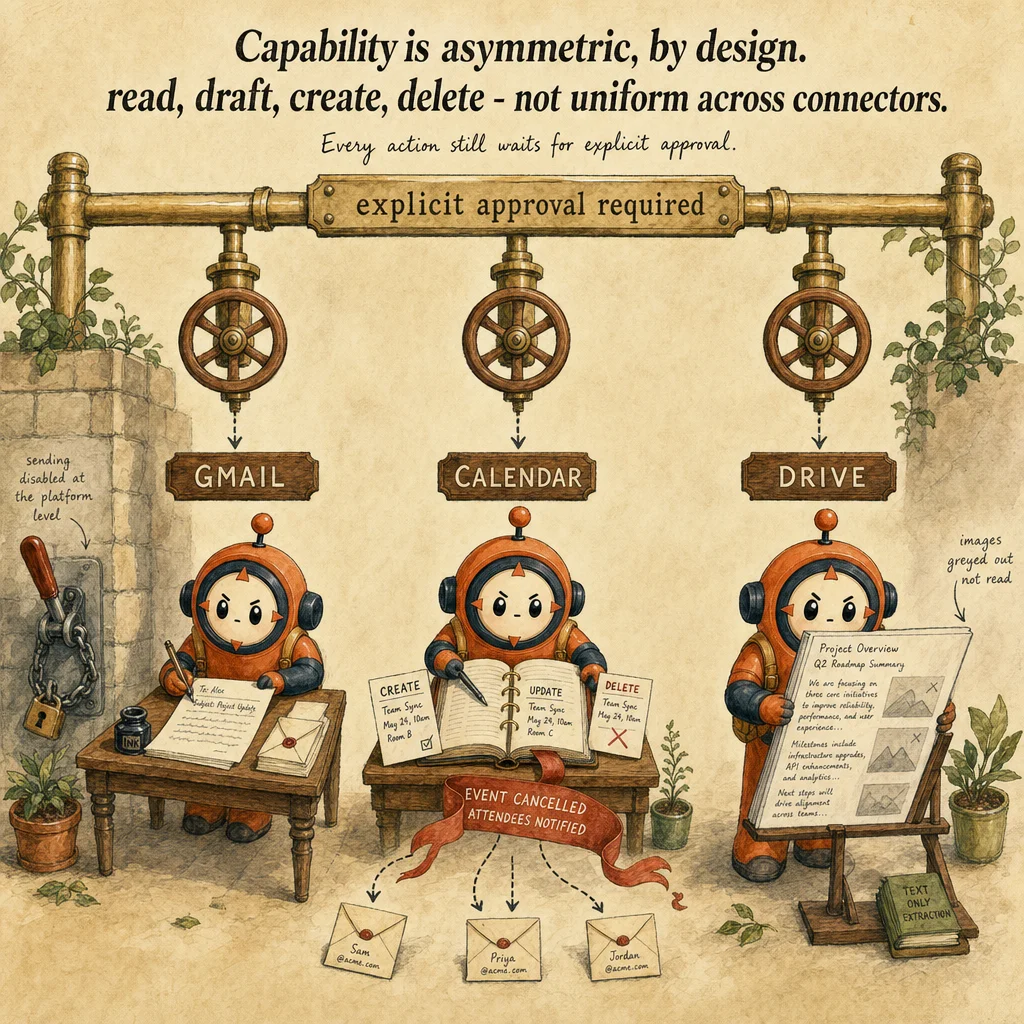
Per-connector capability is asymmetric, and the exam tests knowing the specific asymmetry, not just "connectors are live." The Gmail connector can search, read, and summarize email, and create drafts, but sending is disabled at the platform level: every email must still be sent manually from the actual Gmail account, and attachment content is unavailable, only metadata. The Google Calendar connector, by contrast, has real write power: it can create, update, and delete events, manage attendee lists, respond to invitations, and set up recurring meetings, deleting an event triggers an automatic cancellation notice to attendees. The Google Drive connector reads text content from supported file types (images embedded in documents are not processed) and, when code execution is enabled, can also save Claude-generated files back to Drive. Across every connector, Claude Help Center guidance is explicit: each action Claude takes on the user's behalf requires the user's explicit approval before it executes, this matters most for Calendar since creating, updating, and deleting events are real, externally visible actions, not just reads.
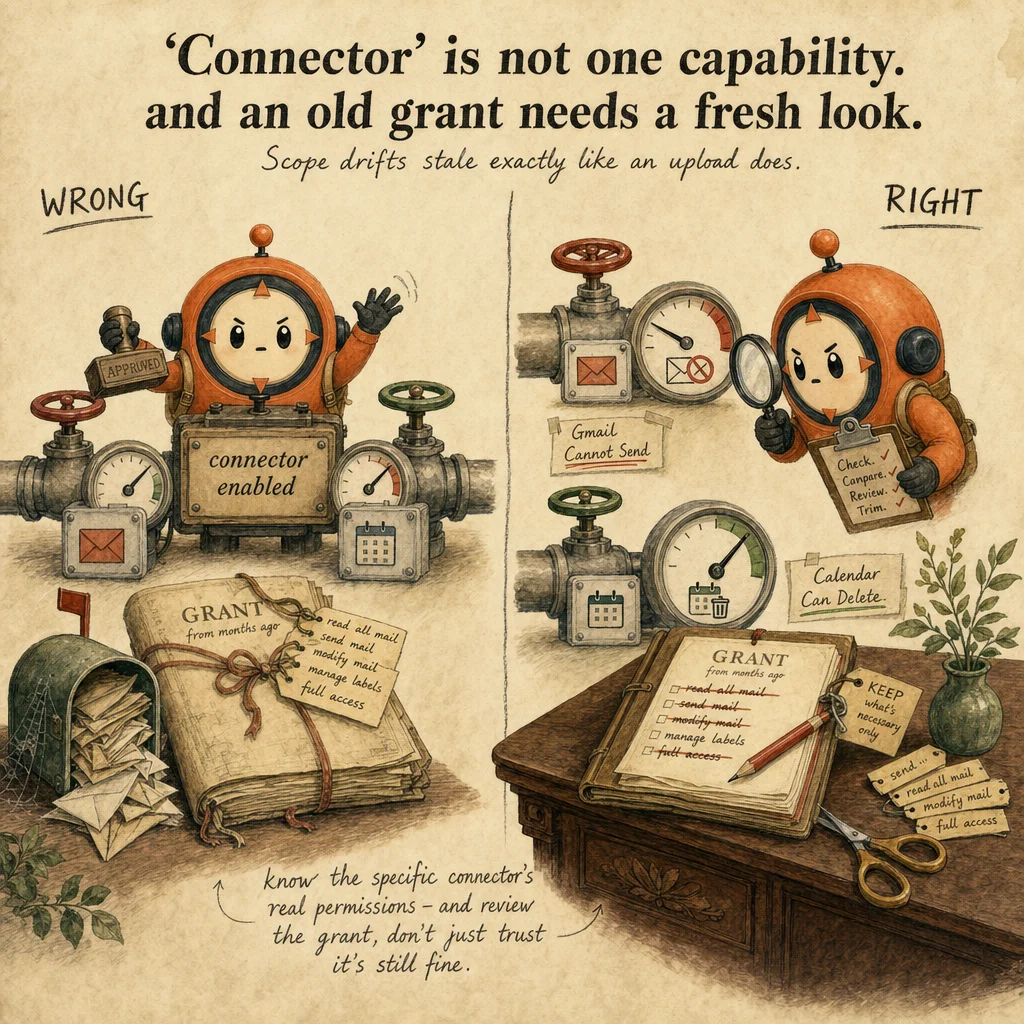
Governance runs on the same access-scoping principle regardless of which connector: Claude only accesses connected data when a specific question or action requires it, and retrieves the minimum information needed for that request, rather than pulling everything available up front. But scope still has to be set correctly at grant time, granting full mailbox access when only calendar visibility was needed is a governance gap even though it may work fine that day, the exam trap is treating "the connector exists and is enabled" as sufficient, when the actual objective is scoping and periodically reviewing what each connector was granted.
Worked example: a shipment sheet that changes every day
Authored teaching example, not a bank question.
A logistics coordinator wants to know which shipments are delayed. The status sheet is updated several times a day. Finance holds its cost data in a separate spreadsheet that the coordinator's account cannot open.
| Option | Freshness | Main risk |
|---|---|---|
| Uploaded export | As of the export time | Goes stale without any warning |
| Connected sheet | Retrieved when you ask | Permissions limit what Claude can see |
The coordinator knows how current the answer is and what it could not see. Check afterwards that the stated source time meets the freshness need and that the answer says the finance spreadsheet was not accessible.
How this decision goes wrong
Assuming a stale upload is current
Looks right: The file is in the chat, so Claude is working from the latest data.
Why it fails: An upload is a copy from a moment in time, and Claude has no way to know it changed afterwards.
Instead: Note the snapshot time, or use a connector when the task depends on current data.
Assuming connected access is complete
Looks right: The connector is on, so Claude sees the whole sheet.
Why it fails: Claude mirrors your existing permissions and retrieves only what the question needs, so material in files you cannot open, or that was not retrieved, may be missing.
Instead: Ask which items were retrieved and confirm coverage against the source for anything that matters.
Granting broader access than the task needs
Looks right: Turning on every connector saves time later.
Why it fails: Extra access widens what a mistake or a misdirected request can touch, and complicates review.
Instead: Enable only the connector the task needs, and keep sending or sharing actions behind approval.
Where you'll see it
Q3 Vendor Review Project
Vendor contracts are uploaded as static project knowledge (retrieved by clause on demand), while the Gmail connector pulls the latest vendor correspondence live and the Drive connector references a shared scorecard spreadsheet that changes weekly, each source managed and revoked independently.
Scheduling assistant built on the Calendar connector
Creates, updates, and RSVPs to meetings on a user's behalf within that user's own existing calendar permissions, the two-gate model (org enables, user authenticates) bounds what it can touch even though Calendar's own capability includes real deletion.
Side-by-side
| Connector | Can read / search | Can create or modify | Can delete | What it explicitly cannot do |
|---|---|---|---|---|
| Gmail | Search and read email (metadata only for attachments) | Create drafts | No | Send email, no matter what's confirmed in chat |
| Google Calendar | View events and availability | Create, update, RSVP, set recurring meetings | Yes, with automatic cancellation notices | Nothing structurally, this is the most action-capable of the three |
| Google Drive | Read text content of supported files | Save Claude-generated files back to Drive (requires code execution enabled) | No | Process images embedded inside documents |
Decision tree
Does the underlying source change over time (a mailbox, a shared calendar, a live spreadsheet)?
Is this connector being enabled for a Team or Enterprise organization rather than an individual account?
Could this connector, once enabled, take a destructive or externally visible action (e.g. deleting an event, sending on someone's behalf)?
Was this connector's permission scope reviewed after it was first granted?
The exam trap
The trap is treating connectors as one undifferentiated "live access" capability. Gmail and Calendar are both live connectors, but Gmail can never send email regardless of configuration while Calendar can delete events and notify attendees outright. A CCAO-F question is more likely to test whether you know to scope and periodically review a specific connector's real permissions than whether you know connectors exist at all.
Question patterns
CCA-A practice questions
6 approved CCA-A questions for this topic. Tap an answer to check it, then read the rationale for every option.
A PM sets up a Project with both uploaded contract PDFs and a live Gmail connector for the same client relationship. What's the key functional difference between these two knowledge sources?
Frequently asked
Showing 6 of 6 questions
Sources and next steps
- Claude Certified Associate - Foundations Exam Guide v1.0 (July 2026), PDF page 5, section: Domains 3 to 7, detailed objectives. Checked 2026-10-16.
- Use Google Workspace connectors (Claude Help Center), section: Permissions and access; Team and Enterprise setup. Checked 2026-10-16.
- Protect, hide and edit sheets (Google Docs Editors Help), section: Protected sheets and ranges: not a security measure. Checked 2026-10-16.
- How can I create and manage projects? (Claude Help Center), section: Project knowledge; Project instructions. Checked 2026-10-16.
CCA-A exam guide: Domain 5, Configuration and Knowledge Management