

On this page
TLDR
A Claude Project is a self-contained workspace with its own chat history and its own knowledge base, configured through two layers: project knowledge (uploaded files) and project instructions (a standing behavioral brief). Nothing said in one chat automatically becomes visible to other chats in the same project - only what's explicitly placed in knowledge or instructions persists, and keeping those instructions swapped and current is a recurring maintenance task, not a one-time setup step.
What you are deciding
A Claude Project has instructions that apply to every chat in it and knowledge that every chat can draw on. Keep both current and non-conflicting, and put anything that must persist into the Project, because chats do not automatically share their conversation content. Memory and chat search are separate features that depend on your plan and settings, so do not rely on them for facts that must persist.
What belongs in the instructions, what belongs in knowledge, and what must be updated when something changes?
What it is
A Project is distinct from a plain one-off chat: every chat started inside a Project belongs to that Project and draws on a shared knowledge base and shared instructions, so a recurring piece of work, a client account, a role, a workflow, doesn't require re-explaining context every conversation. What's shared is the knowledge and the instructions, not the conversational memory itself - each individual chat inside a Project is still its own separate thread, and one chat's back-and-forth is not automatically visible to another chat in the same Project. Two configurable layers do the sharing. Project knowledge is whatever gets uploaded, documents, text, or code the project can draw on. Project instructions is a standing brief telling Claude how to behave inside that project specifically, tone, role, or industry perspective, separate from any single chat's back-and-forth.
Configuring a Project is only half the objective. The other half, informing, maintaining, and updating that configuration as needs change, is just as tested: a Project set up once and never revisited drifts stale exactly the way a document left unedited does. Swapping an outdated uploaded file for a current one, or editing instructions when a role or engagement changes, is the ongoing maintenance half of this skill, not a one-time task.
How each certification frames it
CCA-A: How CCA-A tests Project configuration and maintenance
CCAOF-D5-O1Configure Claude Projects with instructions and knowledge sourcesCCAOF-D5-O4Inform, maintain, and update Claude configurations, knowledge sources, and instructions
The Associate guide covers configuring Projects with instructions and knowledge sources, and informing, maintaining and updating configurations, knowledge sources and instructions (PDF page 5, Domain 5).
This page also answers the tagged decisions about what the instructions field is for, how a Project provides persistent context, and how to maintain a configuration over time.
How it works
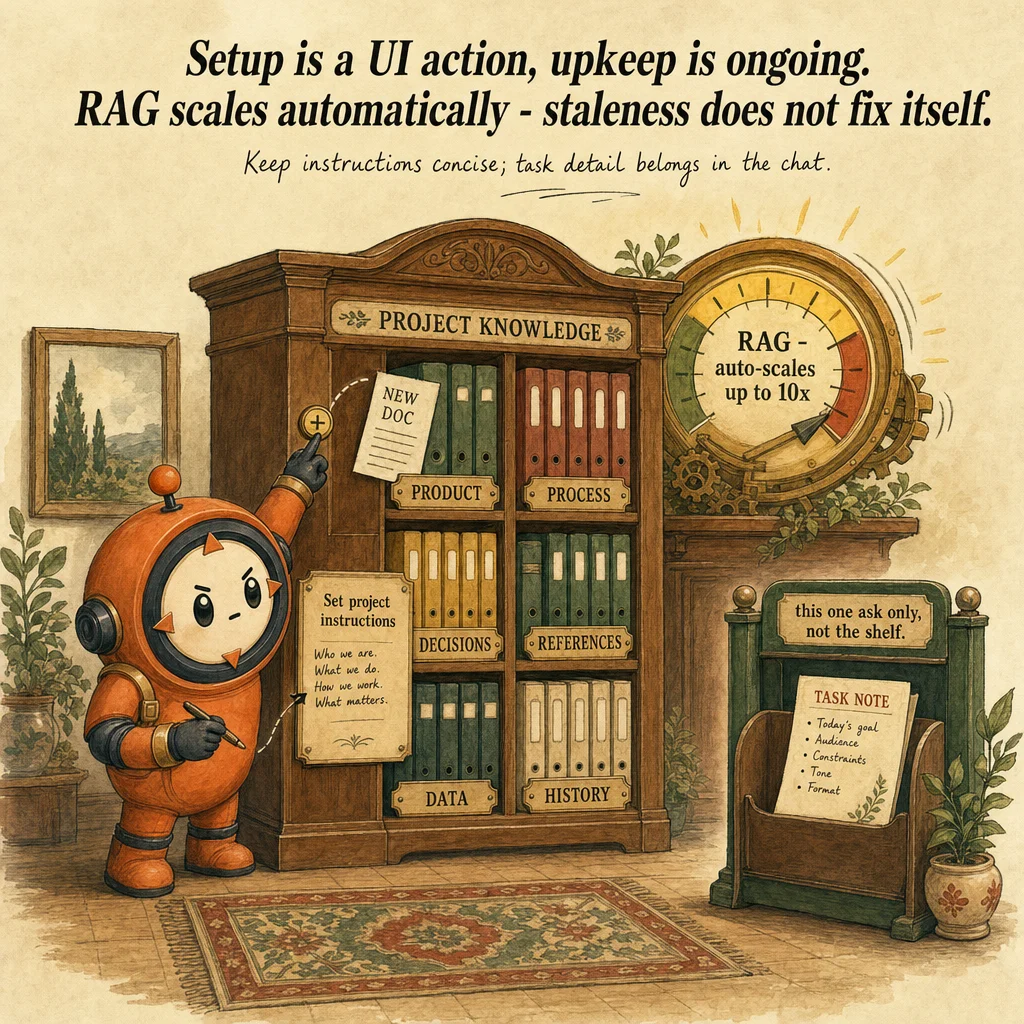
Setting up the two layers is a UI action, not engineering. To add knowledge, click "+" on the project's knowledge panel and upload documents, text, or code. To add instructions, click "Set project instructions," write the brief, and click "Save instructions." Projects are available to every user, including free accounts, though free accounts are capped at a maximum of five projects.
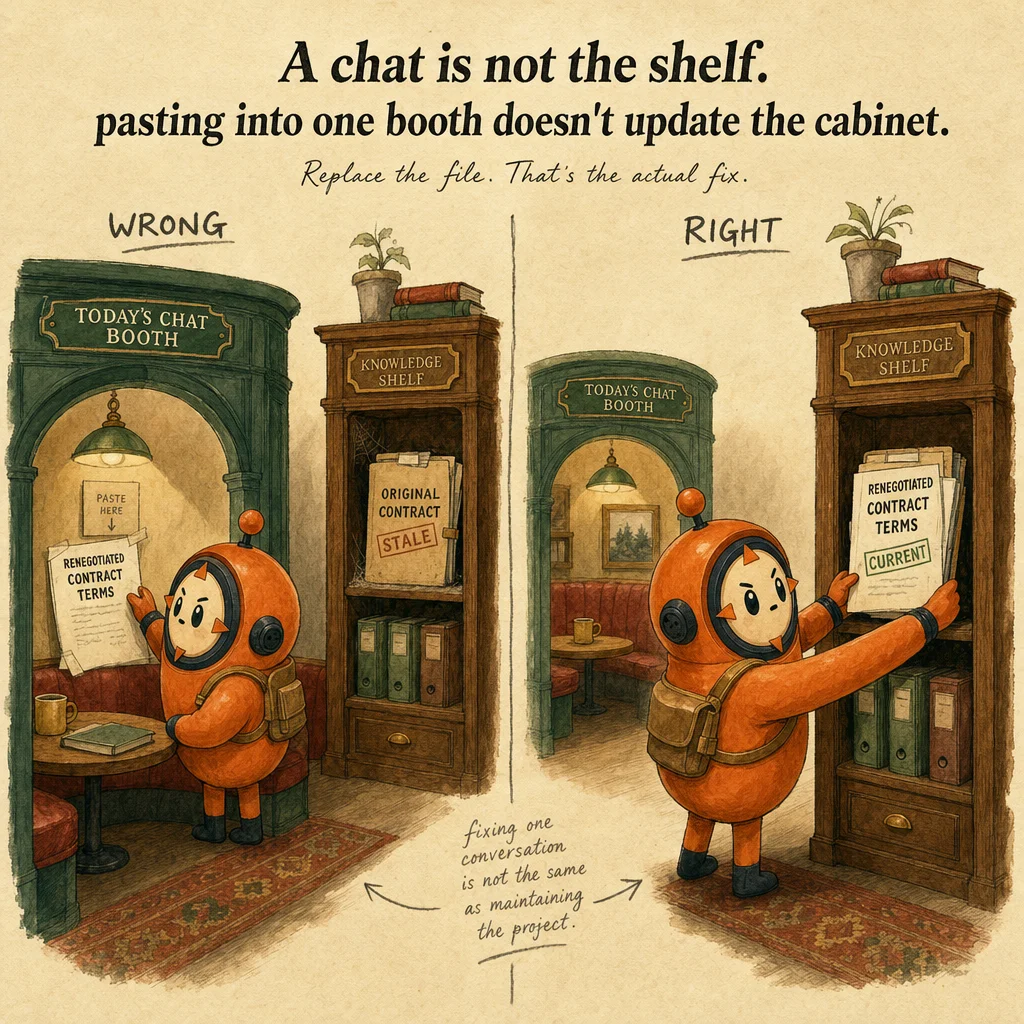
Context does not silently carry across chats. A single chat's back-and-forth inside a Project does not automatically become project-wide context for other chats, only content explicitly placed in the knowledge base or the instructions persists across every chat in that Project. This is the single most commonly tested misunderstanding in this domain.
Knowledge capacity scales without manual setup. RAG (retrieval-augmented generation) for Projects is now available on every plan, free, Pro, Max, Team, and Enterprise, and activates automatically once project knowledge approaches its context-window limit, retrieving only the most relevant snippets per query instead of loading the whole knowledge base every turn. This expands effective capacity by up to 10x with no configuration required, and the system can revert to standard processing if the content volume later shrinks.
Instructions exist at three separate tiers, and only one is Project-specific. Account-wide "Instructions for Claude" apply to every conversation regardless of Project. Project instructions apply only inside that one Project. Skills add reusable behaviors or capabilities Claude can invoke, a related but distinct "styles" control also exists for response formatting specifically, so a business user configuring a Project should default to Project instructions for anything scoped to that Project alone, not the account-wide layer.
Maintaining a Project (CCAOF-D5-O4) means keeping instructions concise and swapping stale knowledge, not writing a longer brief. Anthropic's own guidance is that Claude performs best when project instructions carry general context, key guidelines, and Claude's role, while task-specific detail for one particular ask belongs in the individual chat instead, because shorter instructions leave more context budget for the knowledge that actually needs to be retrieved. When an underlying document changes, a renegotiated contract, an updated policy, the maintenance action is replacing the uploaded file and revising instructions if the role or tone shifted too, not layering a correction into a single chat that other chats in the Project will never see.
Worked example: replacing a stale policy and fixing conflicting instructions
Authored teaching example, not a bank question.
A team Project holds a travel policy document and instructions telling Claude to follow it. The policy changed last month. Two versions of the document sit in knowledge, and the instructions mention an old limit.
| Item | Belongs in | Maintenance trigger |
|---|---|---|
| How Claude should behave and respond | Project instructions | Role or tone changes |
| The travel policy text | Project knowledge | Policy owner issues a new version |
| A decision agreed in one chat | Project knowledge, if it should persist | When the decision is made |
One current document, instructions that reference it, and a dated maintenance step. Check afterwards that no chat answer cites the retired limit, and schedule a review when the policy owner changes the document.
How this decision goes wrong
Duplicate conflicting versions
Looks right: Keeping the old file as a backup is safe.
Why it fails: Both versions are available to every chat, so Claude can cite the retired rule.
Instead: Remove superseded files. Keep history outside the Project.
Assuming a conversation becomes shared project knowledge
Looks right: We settled this in an earlier chat in the same Project, so Claude knows it.
Why it fails: Per Anthropic's help article, context is not shared across chats within a Project unless the information is added to the Project knowledge. Memory and chat search, where available, are separate features that vary by plan, can be turned off, and are not a controlled record of a decision.
Instead: Add anything that must persist to the knowledge base or the instructions, and treat memory and chat search as a convenience.
Where you'll see it
Client onboarding Project
A PM uploads the client's SOW, prior meeting notes, and a style guide to project knowledge, then writes project instructions telling Claude to answer as a senior consultant in a formal tone, every new chat inherits both automatically.
Ongoing policy-reference Project maintenance
An HR team keeps an internal policy-Q&A Project current by replacing the uploaded policy PDF each time a policy updates, rather than letting the Project answer from a stale document indefinitely.
Side-by-side
| Layer | Scope | Persists across chats in the Project? | Best for |
|---|---|---|---|
| Instructions for Claude (account-wide) | Every conversation, any Project | Yes, everywhere | General preferences that apply no matter what you're working on |
| Project instructions | One Project only | Yes, within that Project | Role, tone, and general context specific to this Project |
| Project knowledge (uploads) | One Project only | Yes, within that Project (via RAG once large) | Reference documents the Project needs repeatedly |
| A single chat's own conversation | That one chat only | Not by itself (memory and chat search may apply, depending on plan and settings) | Task-specific, one-off instructions for the current ask |
Decision tree
Will multiple future chats in this Project need this information, not just the one you're in now?
Is the underlying source document (contract, policy, SOW) now out of date?
Is the instruction general (role, tone, scope of the Project) rather than specific to one task?
Does the Project's knowledge base now approach the context-window limit?
The exam trap
The trap is assuming anything discussed in one Project chat is automatically remembered by other chats in that Project, it isn't by default: only content explicitly placed in project knowledge or instructions is guaranteed to persist, and memory or chat search, where enabled, are separate features that can be turned off. A second trap: treating project instructions as the place for task-specific, one-off detail, Anthropic's own guidance is the opposite, keep instructions concise and general, and put task-specific detail in the individual chat.
Question patterns
CCA-A practice questions
6 approved CCA-A questions for this topic. Tap an answer to check it, then read the rationale for every option.
A team wants a recurring "translate jargon into plain language" step for every customer-facing doc it produces with Claude, without re-explaining the instruction every single time. What's the best mechanism, per Anthropic's personalization features?
Frequently asked
Showing 4 of 4 questions
Sources and next steps
- Claude Certified Associate - Foundations Exam Guide v1.0 (July 2026), PDF page 5, section: Domains 3, 5 and 6, detailed objectives. Checked 2026-10-16.
- How can I create and manage projects? (Claude Help Center), section: Project knowledge; Project instructions; chats within a project. Checked 2026-10-16.
- Use Claude's chat search and memory to build on previous context (Claude Help Center), section: Chat search; Memory; Project scope; per-chat controls. Checked 2026-10-16.
CCA-A exam guide: Domain 5, Configuration and Knowledge Management