

On this page
TLDR
Optimizing a Claude workflow for efficiency AND effectiveness spans more than one lever: tightening the prompt and output, right-sizing the model tier or its effort setting to the task (with evidence, not reflex), batching and caching repeated work, restructuring the workflow itself, and reusing setup via a persistent Claude Project or a packaged Skill. Anthropic's own guidance sequences this explicitly - engineer for correct output first, establish a baseline, then optimize - not the reverse.
What you are deciding
Standardize a repeated step only once it works: turn it into a reusable prompt with variable inputs and a quality checklist, begin with the frequent tasks, and measure correction effort as well as speed.
Which repeated step is worth standardizing, and how will I know it saved effort?
What it is
This objective covers the full toolkit for tuning a Claude workflow that already works, not building a new one - and it names both EFFICIENCY (speed, cost, less repeated manual effort) and EFFECTIVENESS (the same or better output quality) as the target, not speed alone. Reuse infrastructure - a persistent Claude Project so repeated setup isn't re-explained every session, and a packaged Skill so a proven procedure is invoked rather than re-typed - is one real, well-documented lever, and the one Anthropic's own Projects documentation calls out directly: "For workflow efficiency, create a project per team or topic, upload relevant documents, set tailored instructions." But it is one lever among several, not the whole objective.
The other levers: tightening the prompt and output (trim tokens on both sides while preserving quality, cap length, ask directly for a shorter response); right-sizing the model tier or its effort setting to the task (Anthropic's own model-choice guidance opens two valid starting points - begin cheap/fast with Claude Haiku 4.5 and upgrade only for a proven capability gap, or begin with Claude Opus 4.8 and deliberately lower effort or downgrade once the task is well understood - and notes that tuning the effort parameter is "often a better lever than switching models"); batching and caching repeated work (the Message Batches API cuts cost 50% for latency-tolerant, high-volume jobs; prompt caching cuts the cost of a repeated static prefix - system prompt, tool definitions, a long reference document - by roughly 90% on a cache hit); and restructuring the workflow itself (streaming for perceived responsiveness, decomposing one monolithic prompt into steps that batching or caching can actually apply to). Anthropic sequences all of this explicitly: engineer for correctness first, establish a latency/cost baseline, THEN optimize - "trying to reduce latency prematurely might prevent you from discovering what top performance looks like."
How each certification frames it
CCA-A: How CCA-A tests workflow efficiency
CCAOF-D7-O3Optimize workflows for efficiency and effectiveness
The Associate guide lists optimizing workflows for efficiency and effectiveness (PDF page 5, Domain 7). Efficiency without effectiveness does not count, so items reward options that cut real effort while keeping quality.
Reusable setup can live in Project instructions and knowledge, which Anthropic's Help Center describes as persisting across the chats in a Project. Anthropic's evaluation guidance asks for measurable criteria, which here means recording time and corrections before and after.
How it works
Measure before you optimize - Anthropic sequences this explicitly. Engineer the workflow for correct output first, establish a baseline (latency, cost, and a quality eval), and only then apply an optimization lever. Anthropic's own latency guidance is direct about the ordering: "it's always better to first engineer a prompt that works well without model or prompt constraints, and then try latency reduction strategies afterward. Trying to reduce latency prematurely might prevent you from discovering what top performance looks like." The same discipline applies to a model-tier decision: build benchmark tests against your own use case, compare accuracy/quality/cost across candidate tiers, THEN decide.
Lever: tighten the prompt and the output, not just the setup. Anthropic's reduce-latency guidance names concrete moves: be clear but concise (Claude has no context on your use case beyond what you give it, so over-cutting risks losing needed instruction), ask directly for a shorter response, cap length with max_tokens (a blunt tool - the response is cut off wherever the limit lands, so it suits short-answer formats best), and lower temperature for more focused, typically shorter output. Fewer tokens in and out means less to process and less to generate, on top of any quality gain from a tighter ask.
Lever: right-size the model tier or its effort setting to the task, with evidence, not reflex. Anthropic names two valid starting points: begin with a fast, cheap model like Claude Haiku 4.5 and upgrade only for a proven capability gap, or begin with the most capable model like Claude Opus 4.8 and deliberately lower effort or downgrade once the task is well understood and benchmarked. On models that support it, tuning the effort parameter trades intelligence for latency and cost WITHIN the same model - Anthropic states this is "often a better lever than switching models" outright. Either path runs through the benchmark-and-compare step above; picking a bigger model because a workflow "feels slow," with no evidence behind it, is the trap version of this same lever, not the lever itself.
Lever: batch and cache repeated work instead of reprocessing it. The Message Batches API processes large volumes of requests asynchronously at a flat 50% cost discount, built for latency-tolerant, high-volume jobs (bulk evaluations, classification runs) where an immediate response isn't required. Prompt caching targets a different repetition shape - a static prefix reused across many calls (a system prompt, tool definitions, a long reference document) - and cuts the cost of a cache hit to roughly 0.1x the base input-token rate (a ~90% reduction), while also cutting time-to-first-token on that repeated content. Batch for volume, cache for a shared static prefix; restructuring a monolithic single-shot prompt into steps is often what makes either one applicable in the first place, alongside streaming for perceived responsiveness while total processing time is unchanged.
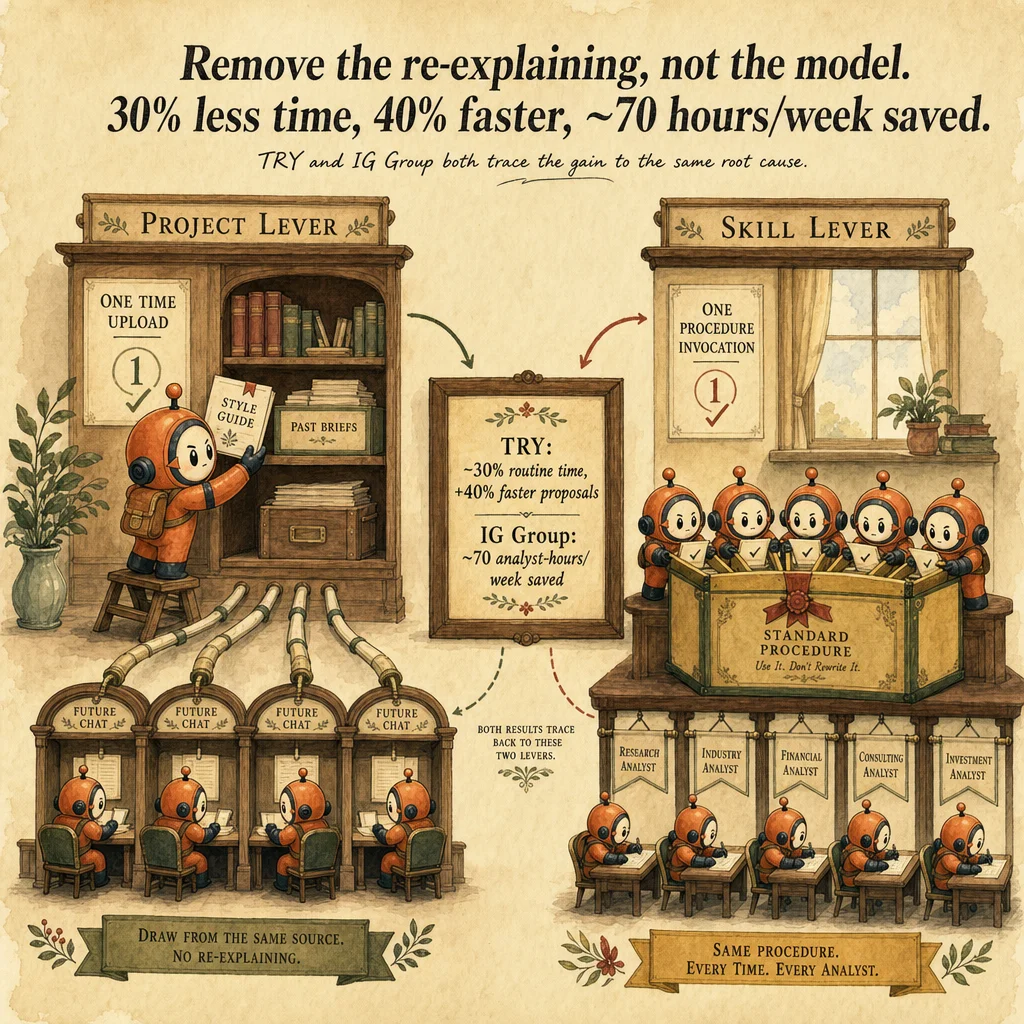
Lever: reuse infrastructure so setup isn't rebuilt every session - a persistent Claude Project and a packaged Skill. Upload the documents Claude needs (style guide, prior briefs, product data) and set custom instructions once in a Project; every future chat inside it starts already grounded. A Skill is a reusable, on-demand instruction set that "converts general-purpose agents into specialists," loaded automatically when relevant rather than re-explained per task - where a Project reuses *context*, a Skill reuses a repeatable *procedure*. The payoff is documented, not just theoretical: Norwegian communications group TRY reports a 30% reduction in time on routine tasks and 40% faster proposal development after standardizing Claude Enterprise use across 50+ use cases; IG Group reports roughly 70 analyst-hours saved per week and ROI within three months.
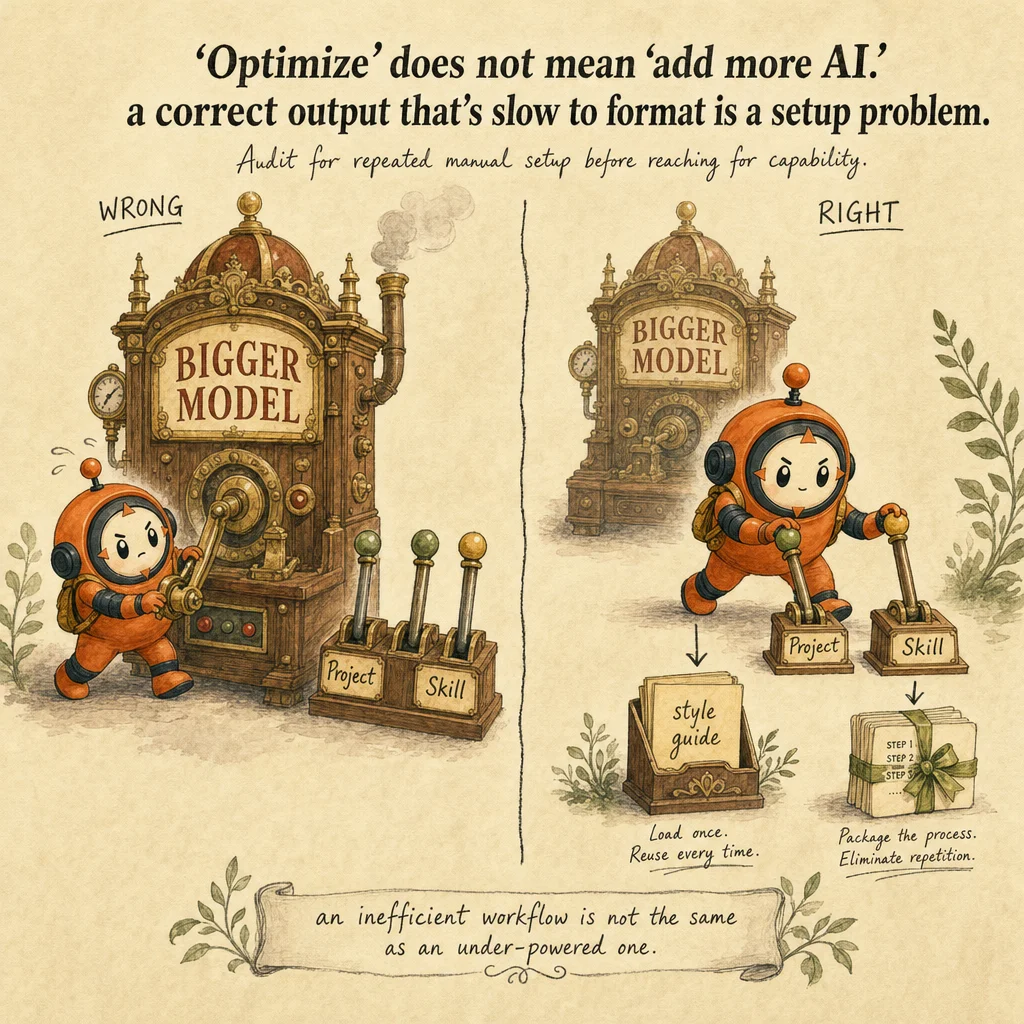
The trap is reaching for a bigger model or more tooling as a reflex, before measuring - not right-sizing the model as a deliberate, evidence-based lever. Swapping in a bigger or pricier model, adding more prompt steps, or bolting on extra tooling WITHOUT first checking for repeated manual setup, un-cached repetition, or an un-benchmarked model choice addresses the wrong variable, or the right variable with no evidence behind the choice. A workflow that already produces correct output but requires re-explaining context every time is *inefficient*, not *under-powered* - the fix is the right lever (reuse infrastructure, caching, batching, a benchmarked model/effort change), chosen after measuring, not a reflex escalation.
Worked example: a weekly project summary
Authored teaching example, not a bank question.
A team lead writes a project summary every Friday from scattered notes and wants to save effort without lowering quality.
| Measure | How to record | Warning sign |
|---|---|---|
| Time to usable draft | Minutes from notes to approved summary | Fast drafts that need heavy rework |
| Corrections per draft | Count of edits the lead makes | Same corrections every week |
| Checklist misses | Items found missing at review | A recurring gap in the template |
The team standardizes the step that repeats most and keeps what is proven. Check afterwards that corrections per draft fell, not only drafting time.
How this decision goes wrong
Optimizing rare work first
Looks right: The quarterly review is the biggest task, so automate it first.
Why it fails: A rare task repays the setup effort slowly, while frequent small tasks add up.
Instead: Rank by frequency and effort, and standardize the repeated steps first.
Preserving a defective process in a template
Looks right: Capturing the current method as a prompt makes it consistent.
Why it fails: A flaw in the method now repeats at speed and looks official.
Instead: Improve the process, then standardize it.
Measuring speed alone
Looks right: Drafts arrive in a minute, so the workflow is better.
Why it fails: If every draft needs heavy correction, total effort may not fall.
Instead: Track corrections and rework alongside drafting time.
Where you'll see it
TRY (communications group, 50+ use cases)
Standardized Claude Enterprise use across teams via shared Projects, reporting a 30% reduction in time on routine tasks and 40% faster proposal development.
IG Group
Reports roughly 70 analyst-hours saved per week and ROI within three months after centralizing repeated analyst workflows instead of re-running them from scratch each time.
Show 1 more examples
High-volume classification with a shared reference document
A team running thousands of latency-tolerant classification calls against the same long reference document combines prompt caching (the static document, ~90% cheaper on a hit) with the Message Batches API (the volume, 50% off) rather than paying full synchronous price for either dimension of the repetition.
Side-by-side
| Symptom | Right lever | Wrong lever (the trap) |
|---|---|---|
| Re-explaining brand voice or context every new chat | A persistent Claude Project with uploaded knowledge + custom instructions, set once | Writing a longer, more detailed prompt each time |
| The same multi-step procedure re-typed by different people | Package it once as a reusable instruction set (a Skill), invoked rather than re-explained | Copy-pasting a written instructions doc into each new chat |
| The same static system prompt, tool defs, or reference doc sent on every call | Prompt caching - ~90% off the cache-hit cost of that repeated prefix | Re-sending the full context every call and accepting it as fixed overhead |
| Thousands of independent, latency-tolerant tasks (bulk classification, evals) | Message Batches API - 50% cost cut, processed asynchronously | Firing every request one-by-one, synchronously, at full price |
| Output is already correct but needs heavy manual reformatting | Ground output in Project knowledge (style guide, past work) so the shape matches on the first pass | Switching to a bigger, pricier model "for better quality" |
| A workflow "feels slow" and the instinct is to upgrade the model | Benchmark accuracy/cost/latency across model tiers or effort settings first, then right-size with evidence | Reflexively switching to the biggest, priciest model with no evidence behind it |
Decision tree
Are you re-pasting the same brand voice, context, or background material into a fresh chat every time?
Is the same static prefix (system prompt, tool definitions, a long reference document) sent on every call, or are there thousands of independent, latency-tolerant requests to run?
Is the output already correct but taking many rounds of manual editing to reach the required format?
Is the same multi-step procedure, not just context, repeated across many tasks or by multiple people?
Is the instinct to fix slowness by swapping in a bigger/pricier model, with no benchmark behind that choice?
The exam trap
Treating "optimize" as only "add more AI" - swapping in a bigger/pricier model, adding more prompt steps, or bolting on extra tooling, as a reflex, before measuring. The full set of documented levers is broader than reuse infrastructure alone: prompt/output tightening, evidence-based model/effort right-sizing, batching (Message Batches API, 50% off), prompt caching (~90% off a repeated static prefix), workflow restructuring, and Project/Skill reuse. A workflow that's already producing correct output but requires re-explaining context every time is inefficient, not under-powered - and picking a bigger model without a benchmark behind it is the trap version of a lever that IS legitimate when evidence-based.
Question patterns
CCA-A practice questions
6 approved CCA-A questions for this topic. Tap an answer to check it, then read the rationale for every option.
A marketing coordinator runs the same competitive-brief prompt every Monday, manually re-pasting the brand voice guide and last quarter's positioning notes each time. What's the recommended efficiency fix?
Frequently asked
Showing 5 of 5 questions
Sources and next steps
- Claude Certified Associate - Foundations Exam Guide v1.0 (July 2026), PDF page 5, section: Domains 3 to 7, detailed objectives. Checked 2026-10-16.
- How can I create and manage projects? (Claude Help Center), section: Project knowledge; Project instructions. Checked 2026-10-16.
- Create strong empirical evaluations (Claude API docs), section: Define your success criteria; Eval design principles. Checked 2026-10-16.
CCA-A exam guide: Domain 7, Troubleshooting and Optimization