

What this system is, and its 5 parts
Think of this as the way you let an agent run actual code (a Python data-analysis script, a one-off shell command, a compiled binary) without giving it the keys to your machine. The script runs inside a sandbox: a small isolated container with strict limits on CPU, memory, time, and network. A PreToolUse hook scans the proposed command BEFORE it runs and refuses anything destructive. After the script runs, a PostToolUse hook normalizes the messy raw output into a clean structured result. A semantic validator confirms the output makes sense given the task before the agent acts on it. The whole point is that code execution is too dangerous to be a free tool; it needs four layers of containment.

Bash Tool with Destructive Blocklist
PreToolUse gate, regex-drivenBash sits behind a PreToolUse hook with a compiled regex blocklist (rm -rf, sudo, drop database, kill -9, chmod 777, curl ... | sh). Match exits 2 with a model-readable stderr message; agent observes the deny as tool_result: is_error: true and re-plans. No prompt-injection bypass: the blocklist is in code, not in the prompt.
Configurationmatcher: 'Bash'. Blocklist regex compiled at hook-load time. Allowlist of safe binaries (kubectl, docker, journalctl, jq, ps, df, top). Exit 2 with stderr.Concept: hooks →
Sandbox Runtime (Docker or Firecracker)
fresh sandbox per invocationEach code-exec invocation runs in a freshly spawned isolated environment. Docker for most cases; Firecracker for stronger isolation when running fully untrusted user code. The image is cached so spin-up stays fast (~500ms warm). The sandbox is destroyed after the run; no state leaks between invocations.
ConfigurationSandbox config: { image: code-exec:latest, cpus: 2, memory_mb: 1024, timeout_sec: 30, network: deny, ipc: private, pid: private }. Image is read-only with a small writable tmpfs scratch space.Concept: subagents →Resource Limit Enforcement
kernel-level via cgroups or systemdCPU, memory, time, and network limits are enforced at the kernel level (cgroups for Docker, jailer for Firecracker, systemd-run --property=TimeoutStartSec=30s for raw process spawn). Kernel limits cannot be caught or ignored. Python signal-handler-based timeouts are the canonical wrong answer: a busy-loop or a try: pass swallows them.
Configurationcgroup limits: cpu.max=2, memory.max=1G, network deny via iptables egress rule. Timeout via systemd-run --property=TimeoutStartSec=30s. Process exit code 137 (SIGKILL) means OOM; 124 means timeout.Concept: tool-calling →
PostToolUse Output Normalizer
raw bytes to structured JSONReal shell output is messy: mixed Unix timestamps and ISO 8601, mixed status code conventions, multiline stack traces, ANSI color codes. The PostToolUse hook normalizes everything into a stable contract: {status, stdout, stderr, duration_ms, peak_memory_mb, exit_code}. Timestamps converted to ISO 8601 UTC. Color codes stripped. Long stdout truncated.
Configurationmatcher: 'Bash'. Hook reads stdin: {tool_name, tool_input, tool_result, latency_ms, peak_memory_mb}. Returns normalized JSON. Truncates stdout > 4 KB. Strips ANSI codes. Always exits 0.Concept: structured-outputs →Semantic Result Validator
task-aware sanity checkSchema validation guarantees shape; semantic validation guarantees meaning. Given the task context, check that the normalized result is sensible: passed + failed + skipped equals total; counts are non-negative. Failed semantic validation routes the agent back with a specific error message; it does NOT propagate bad data.
ConfigurationPer-task validators registered by Skill. Test-runner validator: passed + failed + skipped total. Data-analysis validator: row count > 0; required columns present.Concept: evaluation →
The problem
- Run real Python or shell scripts as part of the agent's workflow, not just simulate them.
- Untrusted code stays contained. A misbehaving script does not destroy the host's filesystem or exhaust its memory.
- Predictable termination. A runaway loop or infinite recursion stops at exactly the configured time limit.
- Consistent output shape. The agent sees a predictable JSON contract regardless of which tool ran or how the script printed.
- Use Bash for everything (including cat file.txt instead of Read). Audit trail is opaque, file I/O and execution conflate.
- No PreToolUse blocklist. A clever prompt-injection in the alert text gets rm -rf /prod to execute.
- No resource limits. A loop allocates 10 GB or runs forever; the sandbox runner is exhausted.
- Heterogeneous raw output passed to the agent. The agent parses inconsistently and routes wrong.
- Schema-only validation. The output matches {status: string} but status is 'banana'. The agent acts on nonsense.
- ✓ File I/O routes to Read / Write / Edit. Bash is reserved for actual command execution.
- ✓ PreToolUse hook on Bash with a destructive blocklist (regex). Exit 2 on match.
- ✓ Sandbox runtime (Docker or Firecracker) with kernel-level limits: CPU 2, memory 1GB, timeout 30s, network deny.
- ✓ PostToolUse hook normalizes raw output to JSON: {status, stdout, stderr, duration_ms, peak_memory_mb}.
- ✓ Semantic validator confirms result shape matches the task type.
- ✓ Audit log: every code-exec invocation writes an append-only row.
One run, traced end to end
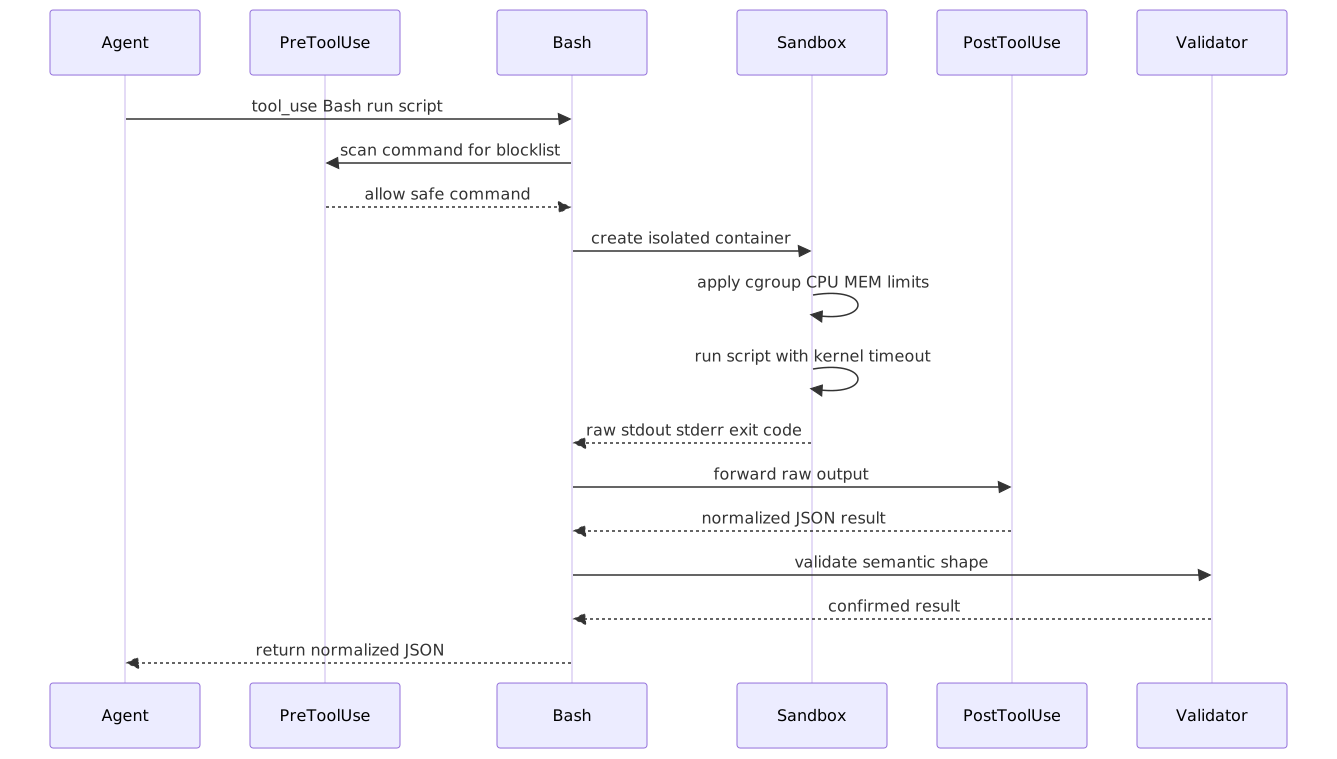

8 steps to production
Route file I/O to built-in tools; reserve Bash for execution
The first layer of safety is tool selection. cat file.txt should be a Read call, not a Bash call. grep -r foo should be a Grep call. find . -name '*.py' should be a Glob call. Bash is reserved for what the built-ins cannot do: compile code, run tests, execute a Python data-analysis script. This single distinction shrinks the Bash blast-radius by ~80%.
Concept: tool-calling →# Wrong: Bash for everything
# tool_use: Bash, command: "cat config.json"
# tool_use: Bash, command: "grep -r 'TODO' src/"
# Right: built-in tools for I/O; Bash only for execution
# tool_use: Read, file_path: "config.json"
# tool_use: Grep, pattern: "TODO", path: "src/"
# tool_use: Glob, pattern: "**/*.py"
# Bash legitimately for execution:
# tool_use: Bash, command: "pytest tests/ --json-report"
# tool_use: Bash, command: "python analyze.py --input data.csv"
import re
FILE_IO_VIA_BASH = re.compile(
r"^\s*(cat|head|tail|less|more|grep|find|ls|wc|sort|uniq|cut|awk|sed)\s",
)
def warn_on_io_via_bash(tool_name: str, command: str) -> str | None:
if tool_name != "Bash":
return None
if FILE_IO_VIA_BASH.match(command):
first = command.strip().split()[0]
return (
f"Bash command starts with {first!r}. "
f"For file I/O prefer Read / Grep / Glob; reserve Bash for execution."
)
return NoneWire the PreToolUse blocklist hook on Bash
The destructive blocklist runs before the sandbox is even spawned. Compiled regex against rm -rf, sudo, drop database, kill -9, chmod 777, curl | sh. Match exits 2; the agent sees the deny as a tool_result with is_error: true and re-plans.
Concept: hooks →Spawn the sandbox with kernel-level limits
Once the blocklist allows the command, the sandbox runs the actual code. Docker is the default; Firecracker for stronger isolation. The sandbox is fresh per invocation, runs read-only with a tmpfs scratch space, and enforces CPU / memory / time / network limits at the kernel level via cgroups.
Concept: subagents →Use kernel timeouts, not Python signal handlers
The canonical wrong answer to 'how do I time-out a script after 30 seconds?' is signal.signal(signal.SIGALRM, handler). Python signal handlers can be caught (try: ... except: pass), can be ignored, and do not fire inside C extensions. Use kernel-level timeouts: systemd-run --property=TimeoutStartSec=30s, Docker's intrinsic timeout. Kernel timeouts cannot be caught.
Concept: tool-calling →PostToolUse output normalizer
Real shell output is messy. The PostToolUse hook normalizes everything into a stable contract before the agent sees it. Strip ANSI color codes, convert timestamps to ISO 8601 UTC, truncate stdout / stderr above 4 KB.
Concept: structured-outputs →Validate the result semantically
Schema validation guarantees shape; semantic validation guarantees meaning. After normalization, run a task-specific validator. For a test runner: passed + failed + skipped total; counts are non-negative. Failed validation returns is_error: true with the specific check that failed.
Concept: evaluation →Test resource limits and timeouts adversarially
Ship the sandbox config; then break it on purpose. Run scripts that allocate 10 GB; verify the kernel kills them at 1 GB with exit code 137. Run busy loops; verify timeout at 30s with exit code 124. Run network-egress attempts; verify the deny rule fires.
Concept: evaluation →Audit-log every code-exec invocation
Every code-exec invocation writes an append-only row to durable storage: timestamp, command, hook decisions, sandbox metrics (duration, peak memory, exit code), validation outcome, agent that requested it. Retain for at least 90 days.
Concept: evaluation →9 decisions the exam turns into distractors
Use Bash. command: 'cat config.json'.
Use the Read tool. file_path: 'config.json'.
System prompt instruction: 'never run destructive commands'.
PreToolUse hook on Bash with a compiled regex blocklist. Exit 2 on match.
Python signal handler: signal.signal(signal.SIGALRM, handler).
Kernel timeout: systemd-run --property=TimeoutStartSec=30s, or Docker --timeout, or cgroup limit.
Schema validation only: the JSON has the expected shape.
Semantic validation: passed + failed + skipped equals total; counts are non-negative; total > 0 for a non-empty run.
Agent calls Bash with cat data.json, grep -r foo, find . -name *.py. Audit trail is opaque and the PreToolUse blocklist has to reason about every cat / grep / find.
Route file I/O to built-in tools: Read, Grep, Glob. Reserve Bash for actual command execution. The first layer of safety is tool selection.
A clever prompt-injection in alert text gets rm -rf /prod past the agent. The Bash command runs because no hook scanned it first.
PreToolUse hook with a compiled regex blocklist (rm -rf, sudo, drop database, kill -9, chmod 777, curl | sh). Match exits 2 with stderr.
An agent's Python script allocates 10 GB and crashes the runner. Another runs an infinite loop and starves the queue.
Sandbox config with kernel-level limits: CPU 2, memory 1024 MB, timeout 30 s, network deny. Enforced via Docker cgroups, Firecracker jailer, or systemd-run scopes.
Bash output goes straight back: mixed Unix timestamps and ISO 8601, ANSI color codes, multiline stack traces. The agent parses inconsistently.
PostToolUse hook normalizes everything: strip ANSI, convert timestamps to ISO 8601 UTC, truncate stdout above 4 KB, emit a stable contract.
The result JSON has the expected shape but passed: -5, total: 0. Schema-valid; semantically nonsense. The agent acts on it.
Semantic validators registered per task: passed + failed + skipped equals total; counts are non-negative; total > 0 for a non-empty run.

Cost & latency
Skill body ~500 tokens system + parameters ~50 tokens + working tokens ~1500-3000 input + ~500 output.
Docker image cached in the runner. Warm spin-up is dominated by container start and cgroup setup.
Sandbox spin-up (500 ms) + actual code (1-5 s) + PostToolUse normalization (50 ms) + semantic validation (20 ms).
Most data-analysis or test-runner Skills are short and small. Resource caps prevent the long tail from dominating.
JSONL row ~2-5 KB per invocation. 10 K invocations per month ~30-50 MB. Negligible at object-storage prices.
Check every gate before release
5 exam-pattern questions
Work through one question at a time, check the architecture, then move through the set.
A Skill executes Python code. The agent calls Bash with command 'cat data.json'. What is the correct tool for this read?
Frequently asked
What languages can a code-execution Skill run?
Anything in the sandbox base image. Common: Python, Node.js, Go, Rust, shell. The image determines available runtimes. For most teams, python:3.12-slim plus a few preinstalled libraries covers 90% of use cases.
Can code access the network?
No by default. --network none denies all egress at the kernel level. Opt in for specific tasks by spawning the sandbox with --network bridge and specific iptables rules.
What happens if code runs out of memory?
The kernel sends SIGKILL when the cgroup memory limit is hit; the process exits with code 137. The harness detects 137 and emits status: oom in the normalized result.
Can code persist state across Skill invocations?
Not by default. Each invocation gets a fresh sandbox with no state from prior runs. Opt-in persistence via a mounted volume on the runner.
How do I validate output semantically?
Per-task validators registered by Skill key. Test-runner validator: passed + failed + skipped total. Data-analysis validator: row count, required columns, aggregate sanity.
Can a Skill call another Skill that does code execution?
Yes. Skill-to-Skill calls are tool calls. Each Skill invocation gets its own sandbox; nesting does not share resources.
What is the timeout for code execution?
30 seconds by default. Configurable per Skill via the sandbox_timeout_sec parameter in the Skill frontmatter. The kernel enforces it; the running code cannot extend or ignore it.